Form 720 Online Filing Guide
What is Form 720?
Form 720 is the federal excise tax filing form required for businesses to report and pay quarterly excise taxes. The most efficient way to file is through the IRS Authorized 720 portal. In this comprehensive guide, we will walk you through the step-by-step process of submitting your Form 720 online using QuickFile720, our IRS-authorized e-filing portal, ensuring a smooth and hassle-free filing experience.
Form 720 Excise Tax - Step-by-Step Online Filing Guide(with QuickFile720)
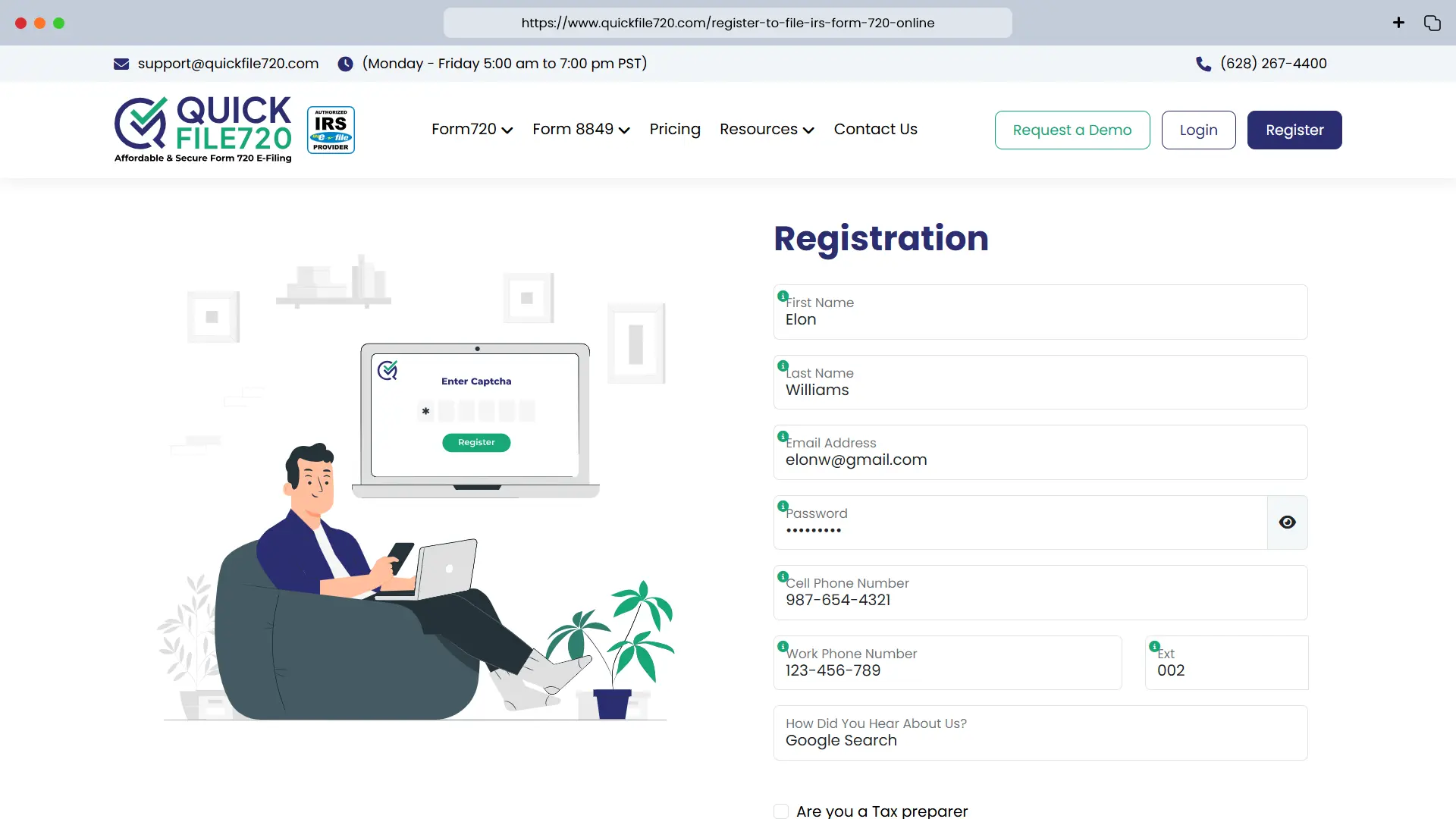
 Step 1: Registration/Login
- New Users: Click on the Register button and enter your basic details to create an account. Once registered, log in with your credentials.
- Existing Users: Simply log in using your existing credentials to access your account.
Step 2: Add New Business (For New Users)
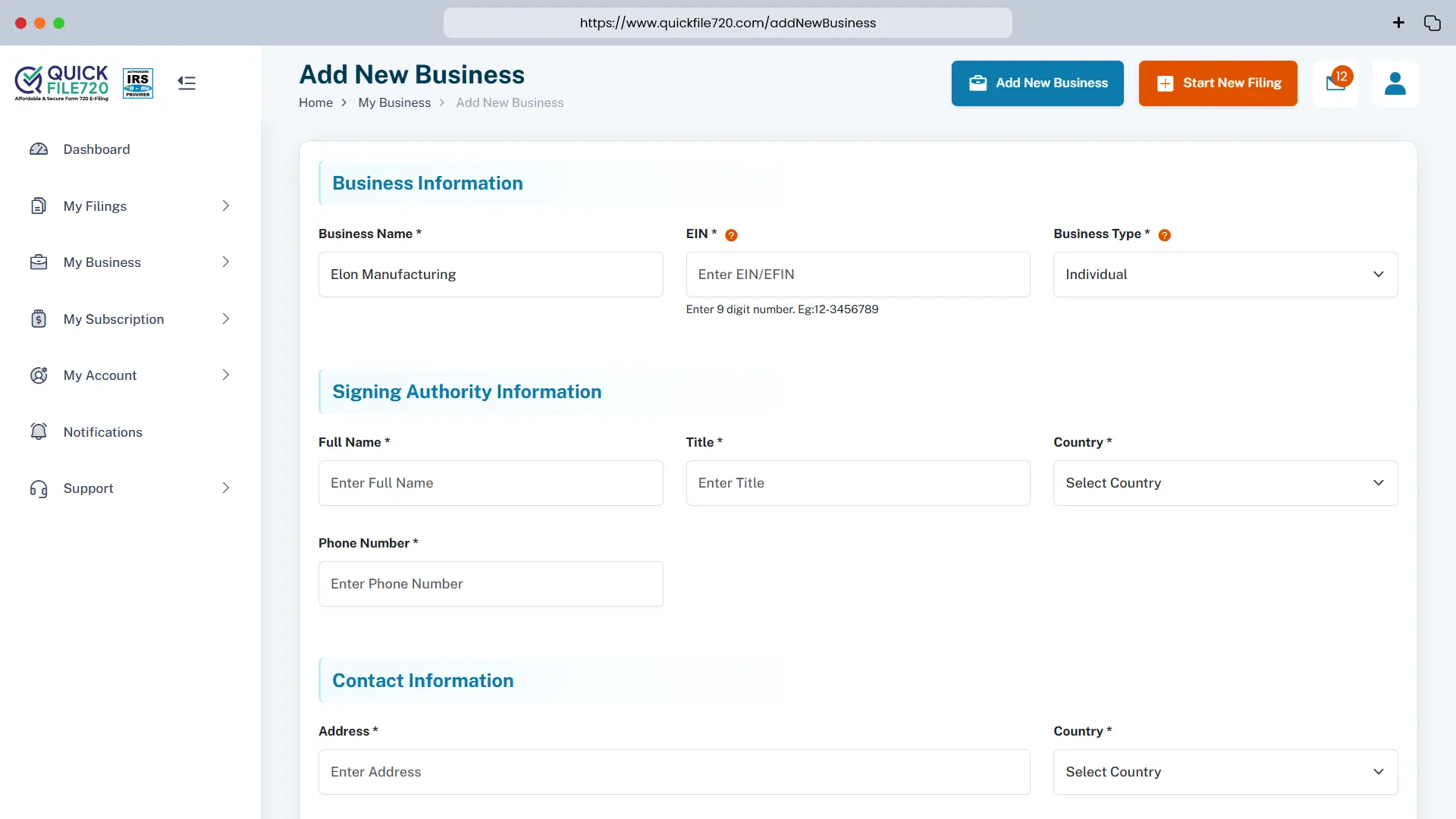
Click on Add New Business and enter your business details:
- Business Name
- Employer Identification Number (EIN)
- Business Type
- Address (with Zip Code) and Phone Number
- Signing Authority Information (Name, Title, Country, and Phone Number)
Your business information will be securely stored in our database for future filings.
- Existing Users: Select your pre-registered business from the dropdown list.
Step 3: Select Form Type
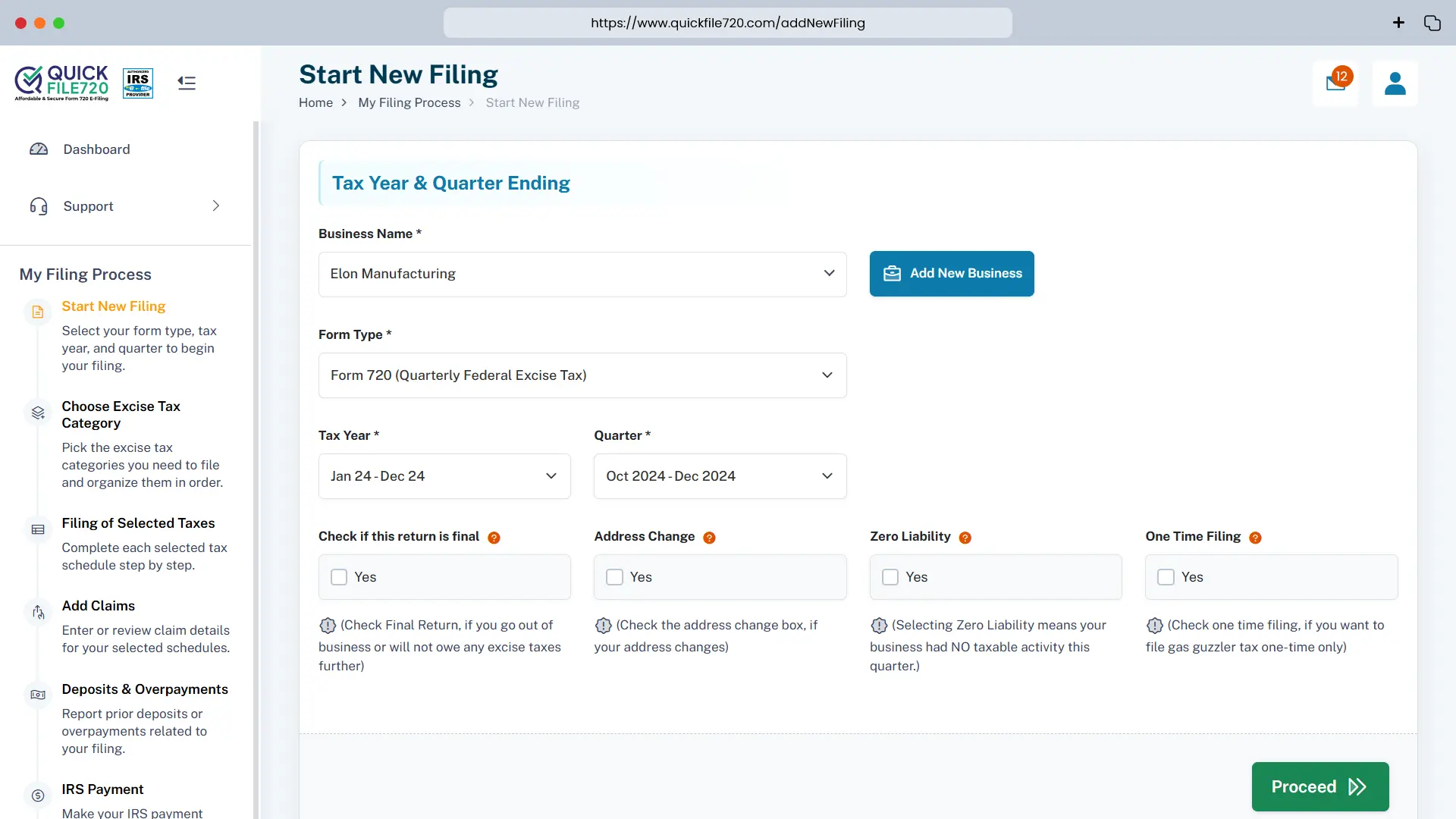
- From the dropdown menu, choose Form 720.
- Enter the Tax Year and select the correct quarter for your filing.
Step 4: Choose Filing Options
Select any applicable options, such as:
- Final Return
- Address Change
- Zero Liability
- One-Time Filing
Choose the options that best apply to your situation, and proceed to the next step.
Step 5: Select Tax Categories
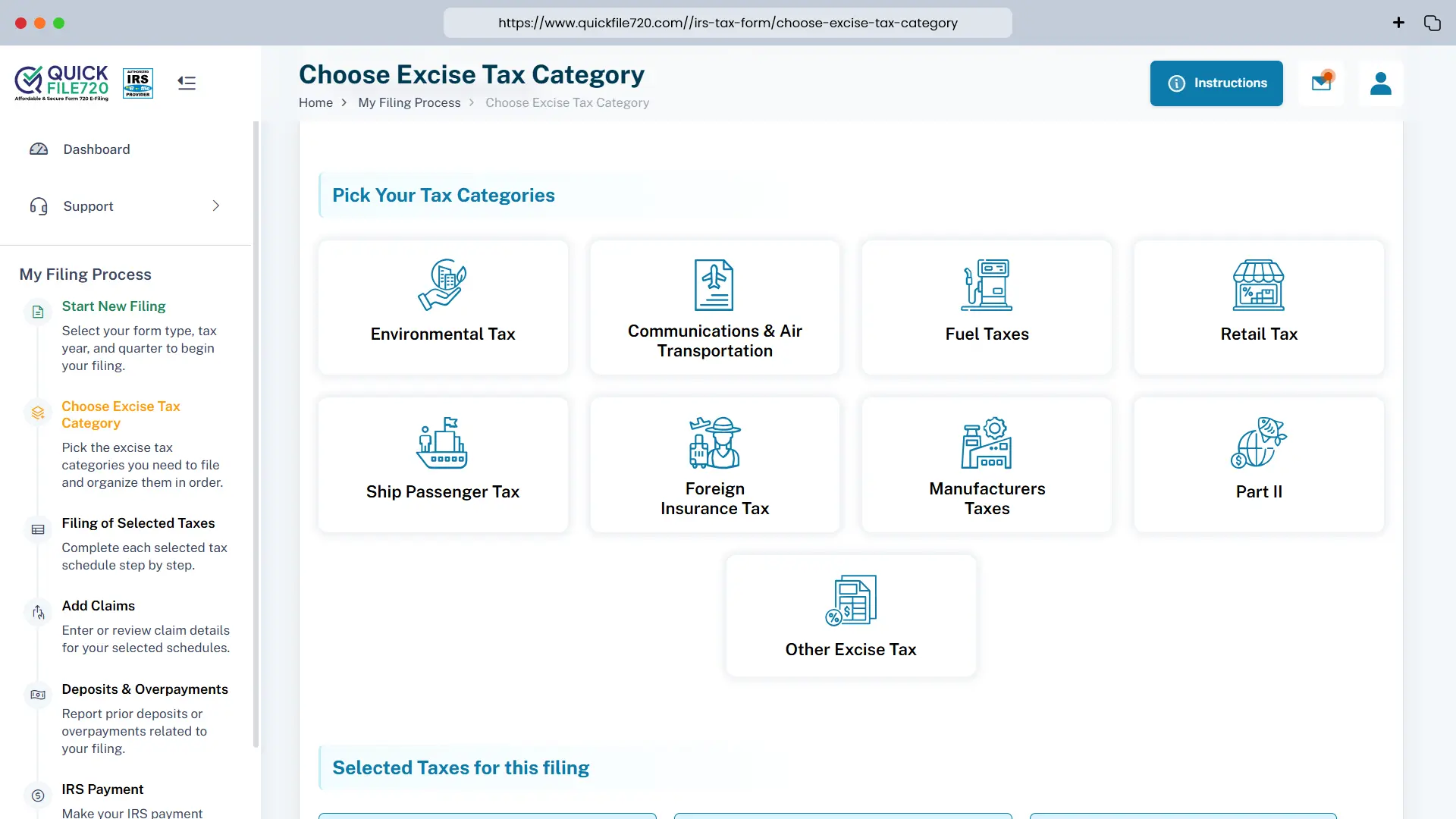
- We’ve provided well-organized categories with corresponding IRS numbers for easy selection.
- Choose your specific tax category, and you may select multiple categories if applicable to your filing.
Step 6: Provide Tax Details
Based on your selected tax category, you will be asked to provide specific details to calculate your tax amount. Some of the required inputs include:
- Tax Date
- Sales Price
- Gallons
- Number of Lives Covered
- Number of Persons
- Premium Paid
- Number of Tons
Please review the details carefully, as the tax amount will be calculated based on the information you provide.
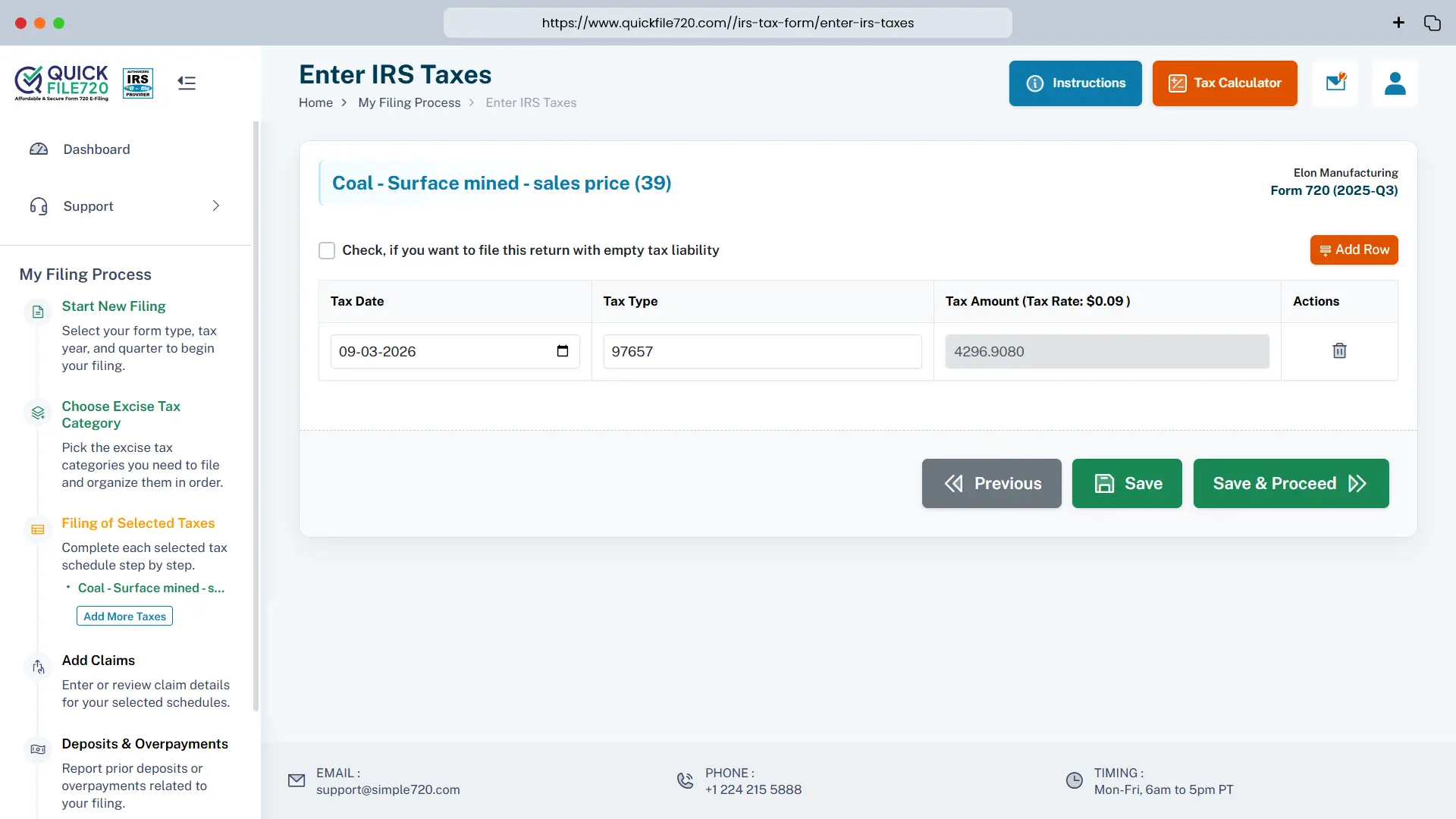
Step 7: Tax Calculation
Select any applicable options, such as:
- Our platform will automatically calculate your tax amount based on the current tax rate for your selected category.
- Review the calculated tax amount displayed on the screen.
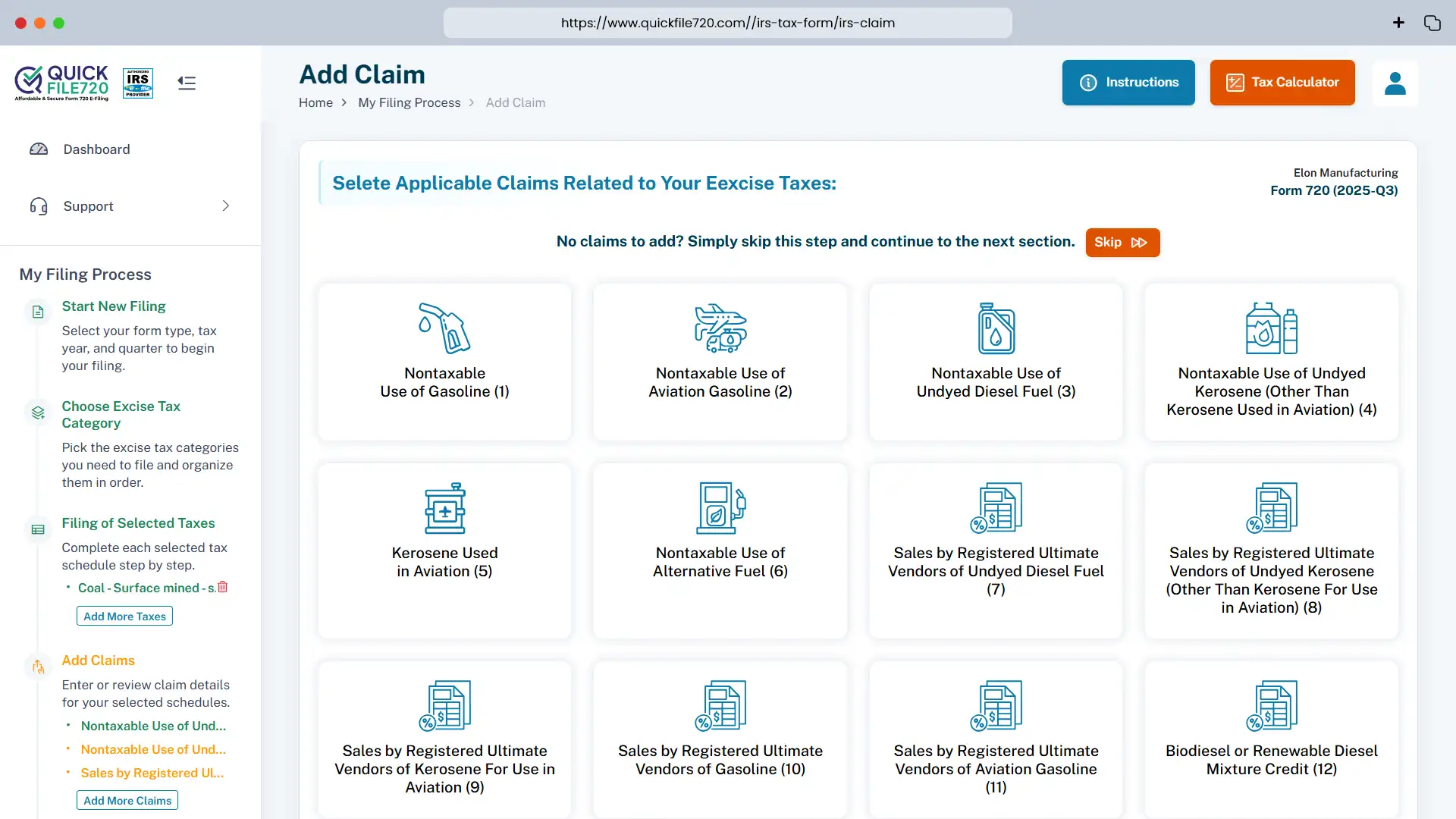
Step 8: Claim Refunds (If Applicable)
Select any applicable options, such as:
- If you're eligible for any refunds, you will have the option to claim your refund at this stage.
- If you are not eligible for a refund, simply skip this step and proceed to payment.
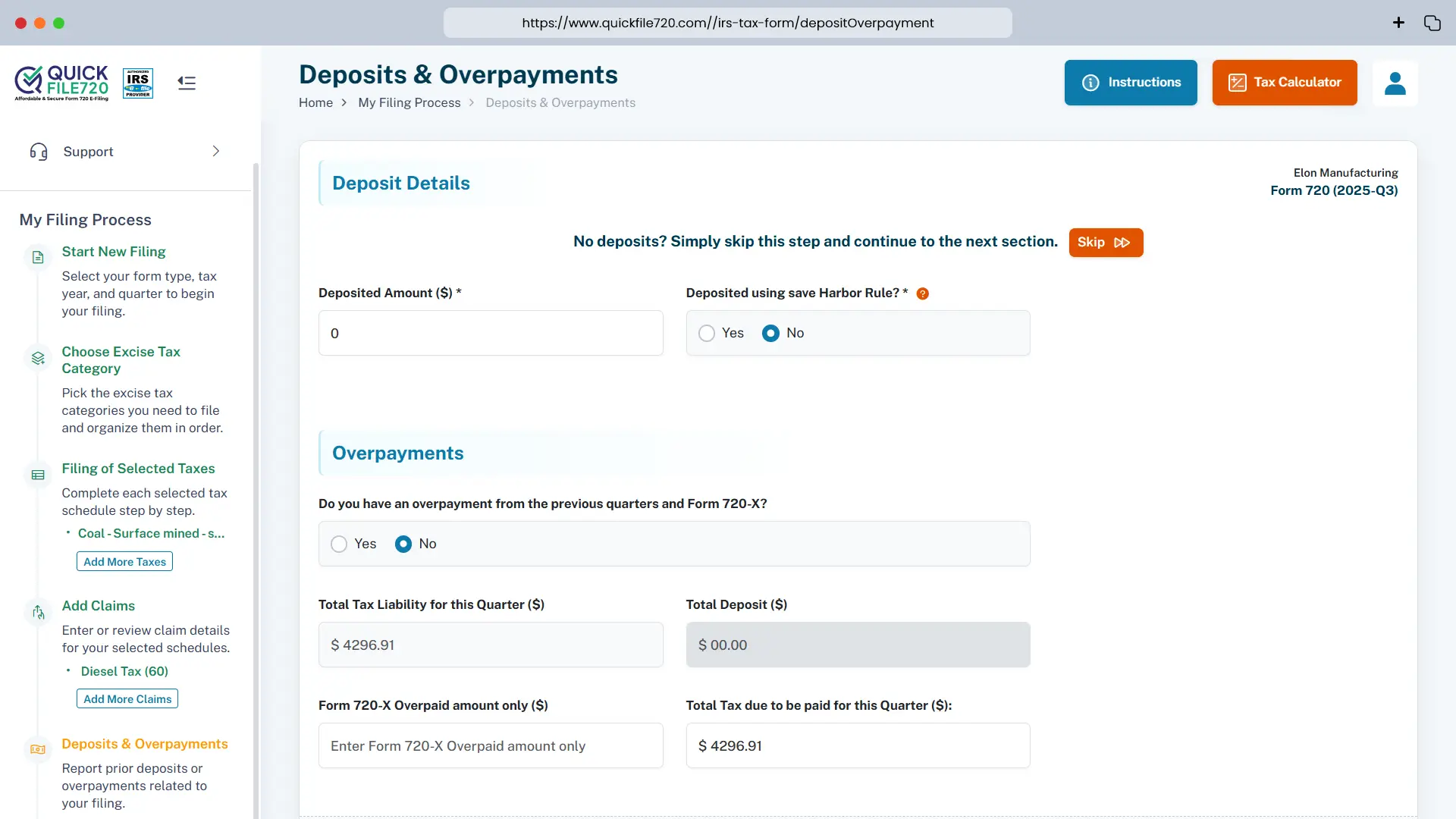
Step 9: Calculate Deposits or Overpayments for Payment Adjustment (If Applicable)
In this step, you will have the option to calculate any deposits or overpayments that may apply to your filing. If applicable, you can use these amounts to adjust your payment accordingly. If you are not eligible for any adjustments, simply skip this step and proceed to the next stage of the filing process.
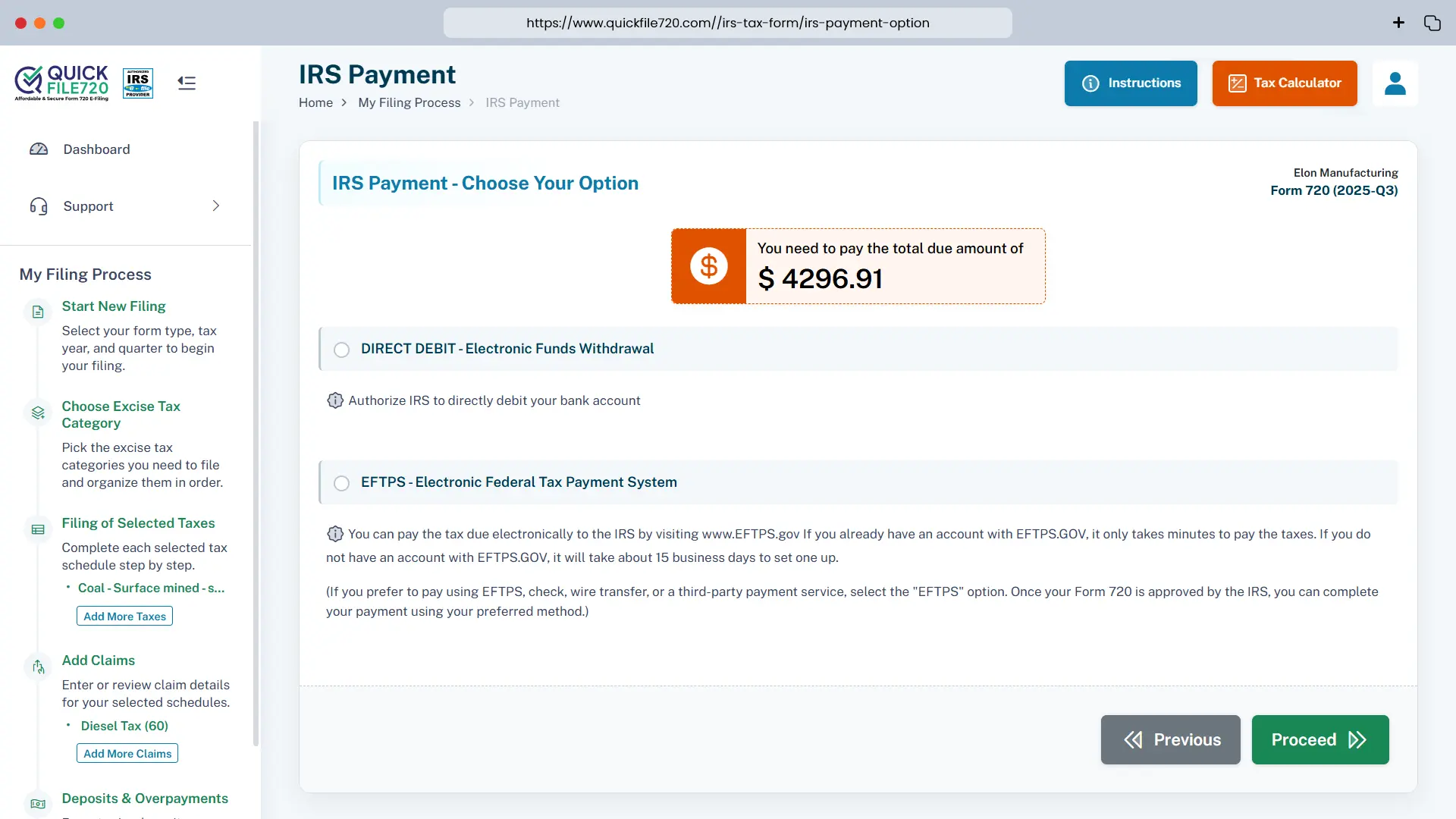
Step 10: Payment Options
Choose one of the following secure payment methods to complete your filing:
- DIRECT DEBIT (Electronic Funds Withdrawal)
- EFTPS (Electronic Federal Tax Payment System)
Step 11: Final Summary
Review the final summary of your filing, which will include:
- All options selected
- The tax amount calculated
Once you’ve verified the details, proceed to complete your payment.
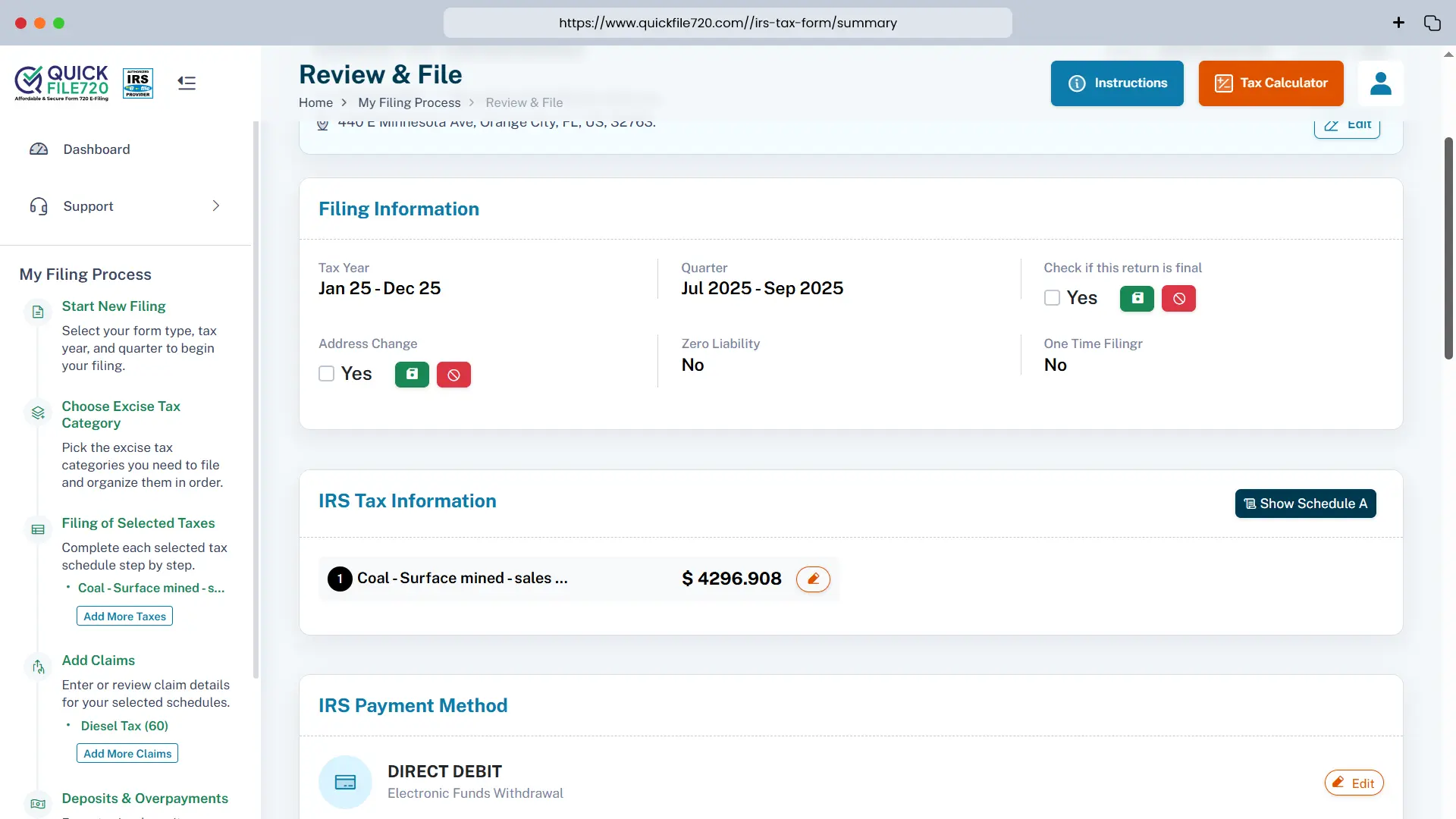
Step 12: IRS Submission and Instant Acknowledgement
Once your payment is processed, your filing will be successfully submitted to the IRS. Upon approval, you will receive an instant acknowledgment. In most cases, the IRS will approve your filing within a few hours.
This process ensures that your Form 720 is filed accurately, securely, and on time. If you need any assistance, our support team is available to guide you through each step.
Why Choose QuickFile720 for FET Filing? Our Exceptional Features
1. IRS-Authorized Platform – Trust in our services, as we are an officially IRS-authorized
e-filing platform, ensuring complete compliance and security for your tax filings.
2. Affordable & Transparent Pricing – We offer the most competitive processing fee of just $35.95 per filing, with absolutely no hidden charges. Enjoy top-quality service at an unbeatable price.
3. No Software Downloads Needed – Experience hassle-free filing without the need for any software downloads or updates. Everything is conveniently handled directly in your web browser.
4. Instant Filing Acknowledgement – Receive immediate acknowledgment for your filings as soon as the IRS approves them. In most cases, the IRS can approve your submission within a few hours, keeping your filing process swift and efficient.
Form 720 Due Dates
Form 720 (Quarterly Federal Excise Tax Return) must be filed four times a year, once for each calendar quarter. The return is due by the last day of the month following the end of the quarter.
Below is a clear overview of the Form 720 filing deadlines:
| Quarter | Tax Period Covered | Form 720 Due Date |
|---|---|---|
| Q1 | January 1 – March 31 | April 30 |
| Q2 | April 1 – June 30 | July 31 |
| Q3 | July 1 – September 30 | October 31 |
| Q4 | October 1 – December 31 | January 31 (following year) |
Important Notes:
- If the due date falls on a weekend or federal holiday, the deadline moves to the next business day.
- Form 720 must be filed even if you only have liability for one quarter during the year.
- Many businesses choose to e-file Form 720 to avoid delays and receive faster IRS acknowledgment.
This schedule helps businesses stay compliant with IRS quarterly excise tax reporting requirements.
Form 720 Penalties (IRS Rules)
Businesses that fail to file or pay Form 720 (Quarterly Federal Excise Tax Return) on time may face penalties and interest imposed by the IRS. These penalties are generally governed by Internal Revenue Code (IRC) Section 6651, which applies to failure to file and failure to pay federal taxes.
Below are the common penalties applicable to Form 720 filings.
| Penalty Type | Description | Penalty Amount |
|---|---|---|
| Late Filing Penalty | If Form 720 is filed after the due date and there is unpaid tax. | 5% of the unpaid tax per month (or part of a month), up to 25% of the total unpaid tax. |
| Late Payment Penalty | If the excise tax due is not paid by the filing deadline. | 0.5% of the unpaid tax per month, up to 25% of the unpaid tax. |
| Interest on Unpaid Taxes | Interest is charged on unpaid taxes and penalties until the balance is fully paid. | Interest accrues from the due date of the return until payment is made. |
| Failure to Deposit Penalty | If required excise tax deposits (such as semimonthly deposits) are not made correctly. | The penalty amount varies depending on how late the deposit is made. |
Important Notes:
- The late filing penalty and late payment penalty can apply simultaneously, although the filing penalty may be reduced when both apply in the same month.
- Interest continues to accrue until the entire tax balance and penalties are paid.
- Businesses with larger excise tax liabilities may also be required to make regular tax deposits, and failing to deposit as required can lead to additional penalties.
How to Avoid Form 720 Penalties
To prevent penalties and additional charges:
- File Form 720 on or before the quarterly due date
- Pay the full tax amount on time
- Make required excise tax deposits when applicable
- Use electronic 720 filing and payment methods to reduce delays and errors