
QuickFile720
What Is the Retail Tax on Heavy Trucks, Trailers, and Tractors
and How Much Is It?
The Retail Tax on Heavy Trucks, Trailers, and Tractors is a federal excise tax imposed on the first retail sale of certain heavy highway vehicles and their components. This tax attaches at the time the taxable vehicle is sold for use (not for resale) and must be reported on IRS Form 720, Quarterly Federal Excise Tax Return.
The tax rate is 12 percent of the sales price of the vehicle or taxable article at its first retail sale. This includes the base price of the vehicle and any parts or accessories sold as part of that sale.
Who Is Required to Pay the Retail Excise Tax?
Although the excise tax is legally imposed at the time of the first retail sale, the seller (retailer) of the heavy truck, trailer, or tractor is responsible for collecting and remitting the tax to the IRS.
You must report and pay this tax if you sell heavy highway vehicles or taxable components that qualify under the retail tax rules, including:
Truck chassis and bodies designed for highway use that exceed the applicable weight thresholds

Trailer and semitrailer chassis and bodies that qualify as taxable articles

Highway truck tractors that meet taxable specifications
Common Challenges in Filing the Retail Excise Tax

Determining Whether a Vehicle Is Taxable
Understanding whether a truck, trailer, or tractor meets IRS requirements can be complex. Vehicle weight ratings, design, and highway use must be evaluated carefully.

Identifying the First Retail
Sale
The tax applies only to the first retail sale, not subsequent resales. Determining when a sale qualifies as the first retail transaction is a common source of confusion.

Calculating the Correct Taxable Sales Price
The 12% tax is based on the taxable sales price, which may include certain parts or accessories. Errors often occur when optional equipment or excluded items are misclassified.

Reporting the Tax in the Correct Quarter on Form 720
Even though the tax is paid once, it must be reported on Form 720 for the quarter in which the first retail sale occurs. Reporting it in the wrong quarter can delay processing or trigger IRS follow-ups.

Maintaining Proper Supporting Documentation
Clear records are required to support taxable and nontaxable sales. Missing invoices, unclear contracts, or incomplete documentation can create compliance issues.
Smart Solution for Your Retail Excise Tax Filings
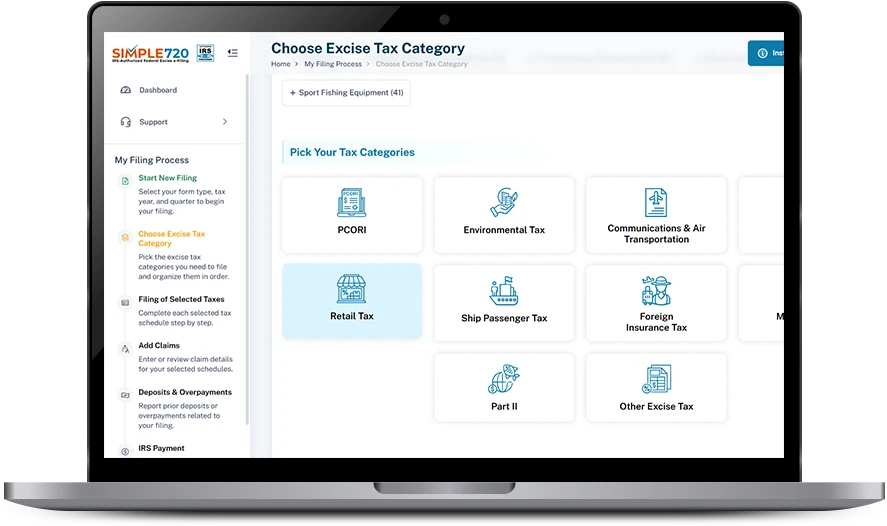
Online filing with QuickFile720 is a simple, reliable solution for managing your Retail Excise Tax filings accurately and on time.
Quarter-Based Filing
Control
Once the correct tax quarter is selected, QuickFile720 enables only the dates that fall within that quarter. This prevents accidental entry of out-of-period tax dates and reduces filing mistakes.
Accurate Form 720 Line Reporting
QuickFile720 guides you to report the retail excise tax under the correct Form 720 category and line, helping ensure the tax is placed in the proper section of the return.
Built-In Tax Calculation Support
The platform calculates the retail excise tax amount based on the values you enter, reducing manual math errors and ensuring consistency with IRS requirements.
IRS-Compliant E-Filing Process
QuickFile720 submits your Form 720 electronically in an IRS-authorized format, helping avoid rejections caused by schema or formatting issues.
Secure Filing and Record Retention
All filed returns are securely stored in your account, making it easy to retrieve copies for future reference or IRS follow-ups.
Retail Excise Tax Filing: Manual vs Online Steps

- Step 1 - Download the latest versions of Form 720 from the official IRS website
- Step 2 - Review Form 720 instructions to locate Retail Excise Tax IRS No.33
- Step 3 - Enter business details including name, address, EIN, and contact information
- Step 4 - Enter the correct tax quarter and tax year manually.
- Step 5 - Identify the correct quarter for filing your retail tax as it should be filed on the first retail sale.
- Step 6 - Manually calculate 12 percent of the Sales price.
- Step 7 - Enter the calculated tax amount on the correct line item. IRS num 33
- Step 8 - Double-check calculations and line entries for accuracy.
- Step 9 - Prepare payment by check or money order payable to the United States Treasury and complete Form 720-V payment voucher
- Step 10 - Mail the completed Form 720 and payment to the appropriate IRS address.

- Step 1 - Create your QuickFile720 account and log in securely.
- Step 2 - Enter your business details including EIN and filing quarter.
- Step 3 - Select “Truck, Trailer, and Semitrailer Chassis and Bodies, and Tractor”, IRS No. 33.
- Step 4 - Enter the Tax date and Sales Price and review the auto-calculated tax.
- Step 5 - Submit your return online with secure payment and receive Instant Acknowledgement
Frequently Asked Questions
Testimonials
Retail Excise Tax filing made simple
QuickFile720 streamlined our Retail Excise Tax filing and helped us complete Form 720 without paperwork or confusion.
Fast, accurate, and reliable
We filed our Retail Excise Tax online with QuickFile720 and avoided common filing errors. The process was clear and efficient.
Stress-free Form 720 filing
QuickFile720 saved us time and ensured our Retail Excise Tax return was filed correctly and on time. Highly dependable platform.
Curious how QuickFile720 streamlines your Retail Excise Tax filing?
Our excise tax experts are available to guide you through the entire process step by step.
Schedule a free demo today and see how simple and efficient Retail Excise Tax filing can be.
Book a Free Demo