QuickFile720
2026 PCORI Fee Amount
| Category | Details |
|---|---|
| Who Pays the PCORI Fee? |
Fully-insured plans: Issuers of specified health insurance policies pay the fee. Self-insured health plans: Plan sponsors (such as employers with self-funded plans) are responsible for paying the fee. |
| PCORI Fee Rate | $3.84 per covered life |
| Plan Years Subject to $3.84 Rate | Plan years ending on or after October 1, 2025, and before October 1, 2026 |
| Authority | Internal Revenue Code Sections 4375 and 4376; IRS Notice 2025-61 |
| Reported On |
1. Form 720, Quarterly Federal Excise Tax Return (Part II – PCORI Fee) 2. QuickFile720 PCORI Fee Reporting Portal |
| Filing Period | Second Quarter (Q2) Form 720 filing |
| Due Date | July 31, 2026 |
| Example | A plan year ending on December 31, 2025 falls under the $3.84 per covered life rate and is reported on Form 720 due July 31, 2026. |
Who Pays the PCORI Fee?
Common Challenges in PCORI Fee Reporting

Manual Data Collection for Covered Lives
You must gather enrollment counts and supporting reports manually from multiple sources. This increases effort and makes it easier to miss data or use inconsistent numbers.

Complex Covered-Life Method Selection and Documentation
Choosing the right method (Actual Count, Snapshot, or Form 5500) can be confusing without guidance. Manual filing also requires you to keep clear backup to justify the method used.

Higher Risk of Form Entry Errors on Form 720
Manual entry on Form 720 and the PCORI line increases the chance of typos and wrong amounts. There’s no auto-calc support, so mistakes can carry through to the final total.

Paper-Based Record Management
Keeping copies of calculations, plan documents, and payment confirmation manually is harder to manage. Records can be misplaced, making audits and future reference difficult.

Payment Coordination and Proof Tracking
Manual filing often means extra steps to ensure payment is made correctly and matched to the filing. Tracking payment confirmation and keeping proof organized becomes an additional burden.
Smart Solution to the PCORI Filing Challenges
QuickFile720 is the only solution to fix all the above discussed challenges. Let’s see Why QuickFile720.
IRS-Authorized Portal
QuickFile720 is directly authorized by the IRS for secure and smart 720 e-filing, ensuring compliance with all IRS regulations. Our portal guarantees that your PCORI submissions get IRS approval in a few minutes.
AICPA SOC Certified Portal
QuickFile720 is AICPA SOC certified, demonstrating that it adheres to the highest security and privacy standards. This certification ensures that your sensitive data is handled with robust controls to protect against unauthorized access.
Simple & Affordable Solution
We offer an intuitive interface designed for ease of use, allowing users to file their PCORI fee quickly. With competitive pricing, it provides a cost-effective solution for businesses of all sizes, eliminating the need for expensive software.
PCORI Fee Excise Tax Filing: Manual vs Online Steps

- Step 1 - Download the latest versions of Form 720 from the official IRS website
- Step 2 Enter business details such as company name, address, and contact information including correct Zipcode
- Step 3 - Provide your EIN and Enter the correct tax quarter for your PCORI filing
- Step 4 - Identify the correct IRS tax category under Part 2 of the form under IRS Number 133
- Step 5 - The Tax rate for each sub category is already specified in the Form 720
- Step 6 - Enter the average number of lives covered in the correct line item
- Step 7 - Perform correct calculations for your PCORI Fee using your preferred calculation method
- Step 8 - Mention the total payable amount at the end of part 2 section in the Form 720
- Step 9 - Complete Form 720-V payment voucher with EIN, quarter, and payment amount
- Step 10 - Attach Form720 with payment and mail the complete package to the correct IRS address

- Step 1 - Create your free QuickFile720 account and log in securely.
- Step 2 - Enter your business information including name, address, EIN, and filing quarter.
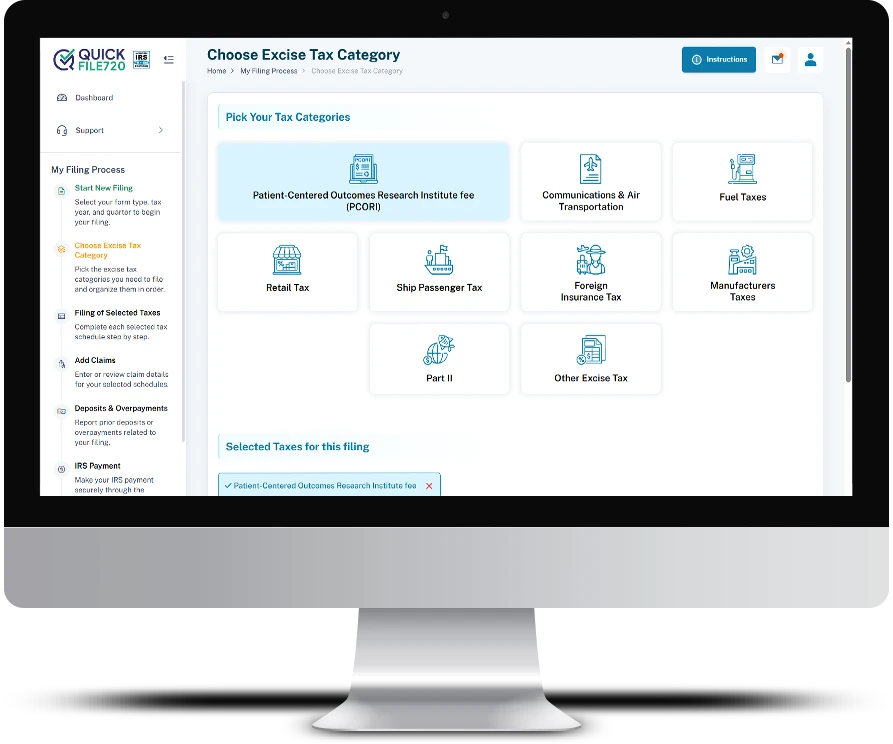
- Step 3 - Select the “Patient-Centered Outcomes Research Fee (133)” Tax category.
- Step 4 - Select the type of policy from the dropdown and enter the number of lives covered
- Step 5 - Review the auto-calculated tax amount and submit your return with secure payment
Frequently Asked Questions
Testimonials
Fast and Easy Filing
QuickFile720 made filing the PCORI fee so easy and quick. The process was smooth, and I saved a lot of time.
Reliable and Secure
I trust QuickFile720 for all our federal excise tax filings. Its IRS authorization and AICPA certification give me peace of mind.
Affordable and Efficient
QuickFile720 is cost-effective and efficient. Filing the PCORI fee has never been simpler.