What is the Manufacturers Excise Tax?
Manufacturers Excise Tax is a federal excise tax imposed on certain products manufactured, produced, or imported for sale or use in the United States. The tax is generally paid by the manufacturer, producer, or importer and is reported quarterly
on IRS Form 720, Quarterly Federal Excise Tax Return.
Specific examples of products covered under the Manufacturers Taxes section of Form 720 include, but are not limited to, taxable tires, coal, gas guzzler, and certain vaccines. But one of the important categories under Form 720 is the Federal Excise Tax on Tires.
Tire Excise Tax
The tire excise tax applies to taxable tires sold by a manufacturer, producer, or importer.
The tax is calculated based on the tire's maximum rated load capacity exceeding 3,500 pounds. The applicable tax rate depends on the type of tire.
The tax is imposed under Internal Revenue Code Section 4071, which provides the federal excise tax on taxable tires sold by manufacturers, producers, or importers.
Firms that are liable for manufacturers' excise taxes are required to indicate the relevant IRS Number along with the tax due by filing Form 720, which is the quarterly federal excise tax return form.
Manufacturer Excise Tax - Step-by-Step Online Filing Guide(with QuickFile720)
 Step 1: Registration/Login
- New Users: Simply click on Register and enter your details to create your profile. Once you are registered, all you have to do is login into your account using your login details.
- Existing Users: Login to your existing account using your login credentials.

Step 2: Add New Business (For New Users)
Click on Add New Business and enter your business details:
- Business Name
- Employer Identification Number (EIN)
- Business Type
- Address (with Zip Code) and Phone Number
- Signing Authority Information (Name, Title, Country, and Phone Number)
Your business information will be securely stored in our database for future filings.
- Existing Users: Select your pre-registered business from the dropdown list.
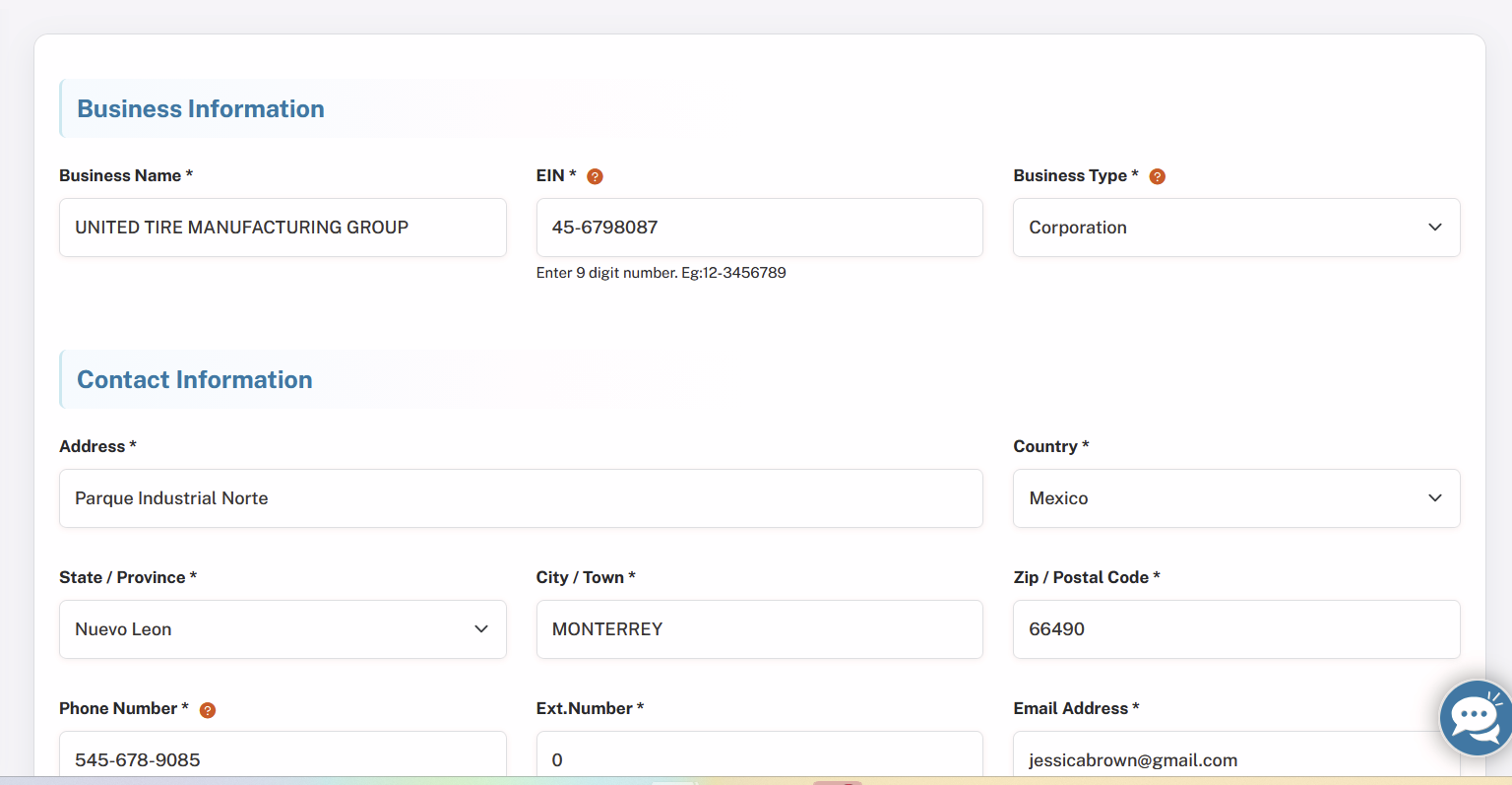
Step 3: Select Form Type
- From the dropdown menu, choose Form 720.
- Enter the Tax Year and select the correct quarter for your filing.
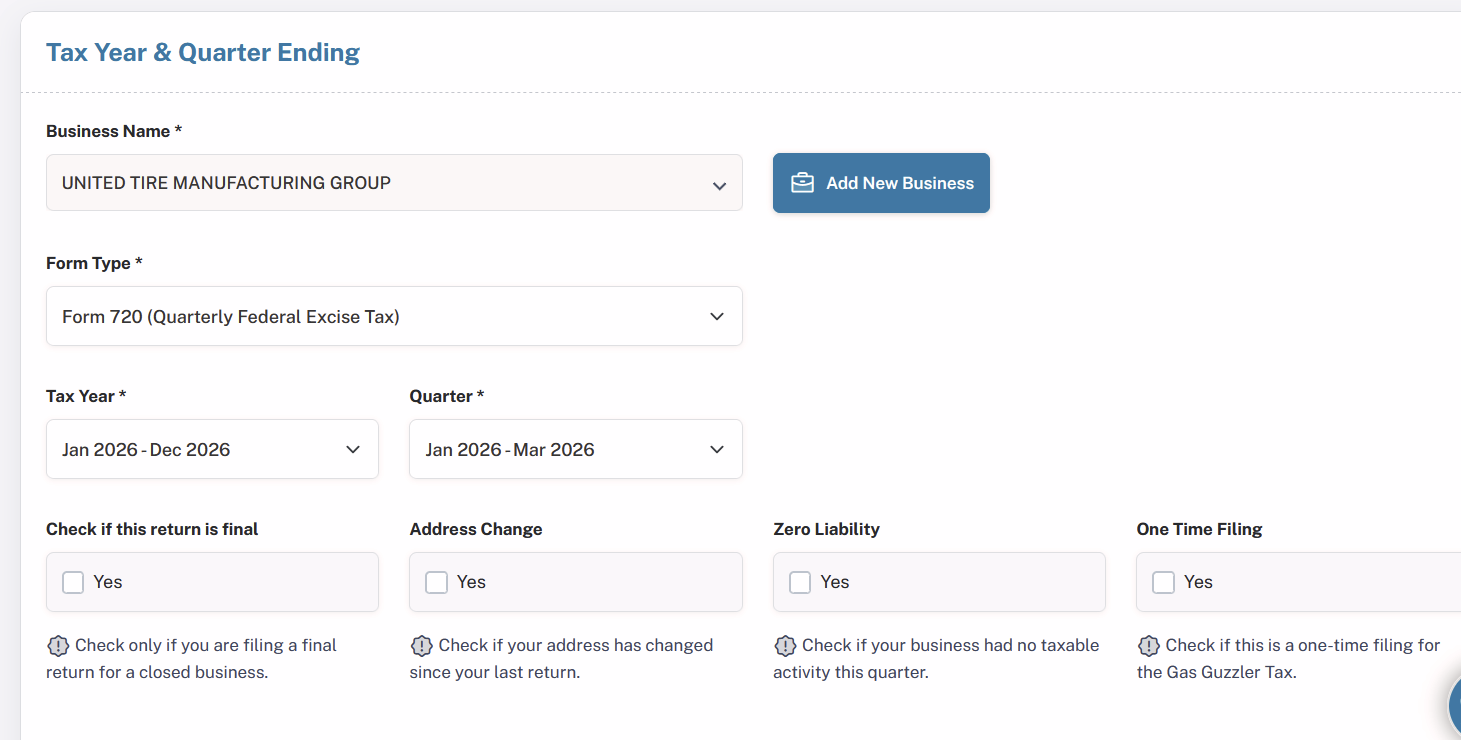
Step 4: Choose Filing Options
Select any applicable options, such as:
- Final Return
- Address Change
- Zero Liability
- One-Time Filing
Choose the options that best apply to your situation, and proceed to the next step.
Step 5: Select Manufacturing Excise Tax Category
- Categories and their respective IRS numbers have been listed systematically so that you can easily choose from them.
- If you want to file, say tire excise tax, please select "Taxable Tires Other than Bias Ply or Super Single Tires (108)" from the category of Manufacturer Excise Tax.
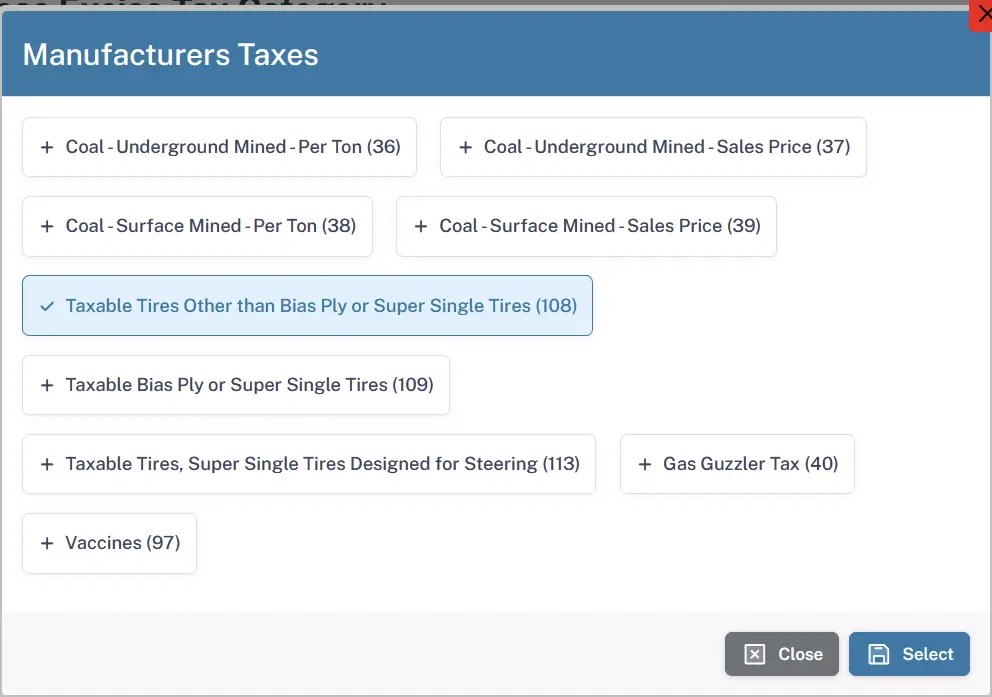
Step 6: Provide Tax Details
The following information is to be furnished by the taxpayer depending on the type of tax selected. In case of tire excise tax, select the type of data and enter the load capacity of tire, tax date, and number of tires.
Please note that the tax amount will be computed on the basis of the information provided above.
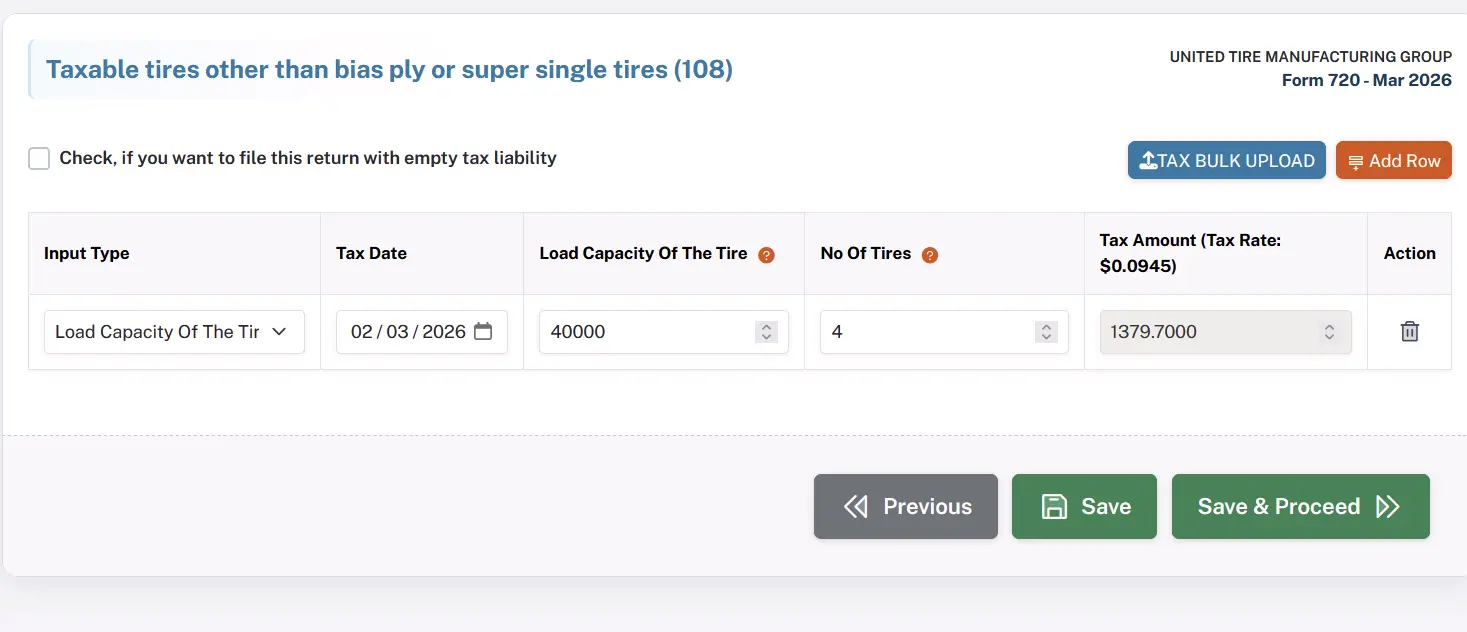
Step 7: Tax Calculation
- Based on the Tax Rate: $0.0945 and information given, our system will calculate the excise tax for you automatically. Please take a look at the calculated tax amount on your screen.
Step 8: Claim Refunds (If Applicable)
- If you're eligible for any refunds, you will have the option to claim your refund at this stage.
- If you are not eligible for a refund, simply skip this step and proceed to payment.
Step 9: Calculate Deposits or Overpayments for Payment Adjustment (If Applicable)
Here, you may decide to calculate any deposit or overpayment that you may have made. In case you have such a scenario, you will use this information in calculating your payments. If there are no corrections that need to be done in your filing, proceed to the next step.
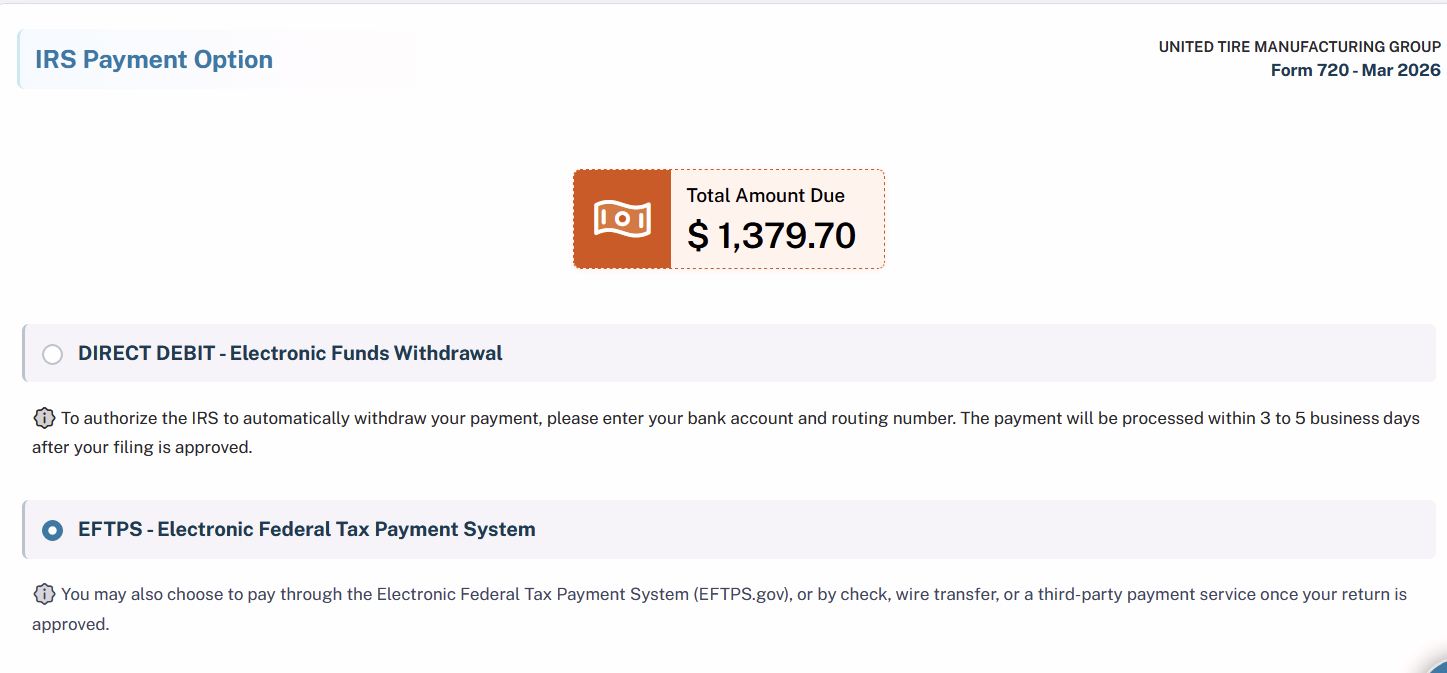
Step 10: Payment Options
Choose one of the following secure payment methods to complete your filing:
- DIRECT DEBIT (Electronic Funds Withdrawal)
- EFTPS (Electronic Federal Tax Payment System)
Step 11: Final Summary
Review the final summary of your filing, which will include:
- All options selected
- The tax amount calculated
Once you've verified the details, proceed to complete your payment.
Step 12: IRS Submission and Instant Acknowledgement
Once you have paid your fees, your manufacturer's excise tax return for tires will automatically be submitted to the IRS by you. After being approved, we will acknowledge you immediately. It is most probable that your form will be approved within a few hours.
The whole process ensures a proper submission of your manufacture excise tax return. If you may need any assistance from our side at any point in time just connect with us.
Why Choose QuickFile720 for your Manufacturer Excise Tax Filing? Our Exceptional Features
1. IRS-Authorized Portal - We have got your back as we are an IRS-authorised 720 portal which abides by all the regulations set by the IRS.
2. AICPA SOC 2 Certified Portal - Relax as we follow all the industry standards. We possess AICPA SOC 2 Certification and thus provide the best security, privacy and integrity.
3. Affordable Portal - Have the cheapest online filing services for the price of $35.95.
4. Easy to navigate - With our easy navigation you don't have to be worried about anything related to complicated filing procedures.
When Is Manufacturer Excise Tax Due?
(Form 720 Deadlines)
According to the IRS, the manufacturer tax must be reported and paid quarterly on IRS Form 720, Quarterly Federal Excise Tax Return.
Below are the common penalties applicable to Form 720 filings.
| Quarter | Tax Period Covered | Form 720 Due Date |
|---|---|---|
| Q1 | January 1 - March 31 | April 30 |
| Q2 | April 1 - June 30 | July 31 |
| Q3 | July 1 - September 30 | October 31 |
| Q4 | October 1 - December 31 | January 31 (following year) |
Important Notes:
- In case of a deadline falling on either weekend or national holiday, the deadline is automatically extended to the following business day.
- Form 720 needs to be filed on a quarterly basis, even in the case where you have liability only for one particular quarter of the year.
- Gas guzzler tax in relation to the manufacture tax requires that form 6197 is included along with form 720
Such a schedule will ensure that companies follow the IRS requirements for quarterly filing of taxes for the manufacturer excise tax.
What are the Manufacturer Excise Tax Penalties
(IRS Rules)
The penalties levied against the manufacturer tax are similar to the penalty levied against form 720 because the manufacturer excise tax is filed through Form 720.
Below are the common penalties applicable to Form 720 filings.
| Penalty Type | Description | Penalty Amount |
|---|---|---|
| Late Filing Penalty | If Form 720 is filed after the due date and there is unpaid tax. | 5% of the unpaid tax per month (or part of a month), up to 25% of the total unpaid tax. |
| Late Payment Penalty | If the excise tax due is not paid by the filing deadline. | 0.5% of the unpaid tax per month, up to 25% of the unpaid tax. |
| Interest on Unpaid Taxes | Interest is charged on unpaid taxes and penalties until the balance is fully paid. | Interest accrues from the due date of the return until payment is made. |
| Failure to Deposit Penalty | If required excise tax deposits (such as semimonthly deposits) are not made correctly. | The penalty amount varies depending on how late the deposit is made. |
Important Notes:
- Both the late filing penalty and the late payment penalty may apply at the same time; however, the late filing penalty is reduced where there are two penalties that apply in the same month.
- Interest will continue to accrue until all tax together with the penalty has been paid.
- Other large taxpayers paying excise tax will also be required to make regular payments, which when not done will incur penalties.
How to Avoid Manufacturer Excise Tax - Form 720 Penalties
To prevent penalties and additional charges for the Manufacturer Excise Tax, follow these essential steps:
- File Within the Deadline - Ensure that you file your Form 720 on time to prevent any penalties for late submission of the Form.
- Make the Full Payment - You should make the full payment by way of tax to prevent yourself from penalties.
Key Points to Remember for Truck Tax
- Tax Rate: The tax rate for taxable tires is based on the maximum rated load capacity of the tire. The tax is imposed at $0.0945 for each 10 pounds of the maximum rated load capacity over 3,500 pounds. Certain taxable tires, including bias ply and super single tires, may have different IRS reporting categories.
- Reported On: Form 720, Quarterly Federal Excise Tax Return.
- Responsible Party: Generally, the manufacturer, producer, or importer of taxable tires is responsible for reporting and paying the excise tax when taxable tires are sold or imported.
- Tax Code: The tax is imposed under Internal Revenue Code Section 4071 - Tax on Tires.