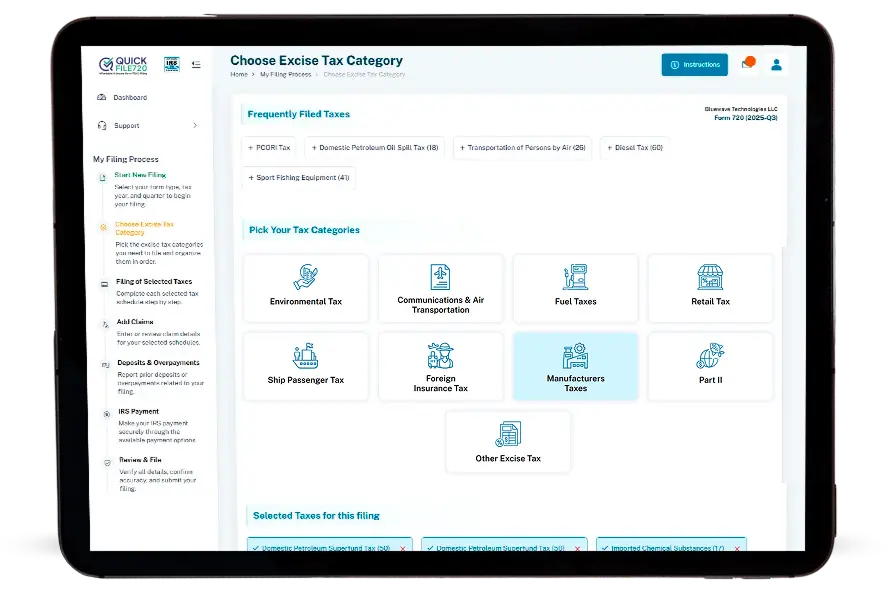

Manufacturer excise taxes are federal excise taxes imposed on the sale, manufacture, production, or import of certain taxable articles. These taxes are governed by different sections of the Internal Revenue Code, depending on the type of taxable product, and are reported on Form 720 (Quarterly Federal Excise Tax Return).
The applicable tax amount depends on the type of taxable product and the calculation method specified under the related IRC section. Depending on the product category, the tax may be calculated based on factors such as sale price, quantity, weight, or other product-specific measurements.
The tax generally applies to
Businesses that manufacture or produce taxable articles subject to federal excise
tax.
Businesses that import taxable articles
and are treated as liable for the excise
tax under applicable IRS rules.
Certain products, such as heavy trucks,
trailers, and tractors, are subject to retail
excise tax rules.
The responsible taxpayer must calculate the applicable tax, report the liability under
the correct IRS Number on Form 720, and follow applicable IRS deposit requirements.

For taxes like the Tire Excise Tax, multiple IRS numbers exist across subcategories. Identifying the correct IRS number for each filing is critical to ensure accurate reporting and avoid IRS rejections.

Coal excise taxes require separating quantities for underground-mined and surface-mined coal. Misclassification can lead to incorrect tax amounts and potential penalties.

Gas Guzzler Tax filings involve managing both Form 720 and Form 6197, adding complexity to tracking, calculations, and timely submission.

Eligibility rules for Vaccine Tax can be complex, making it challenging for manufacturers to identify whether the tax applies, which may result in errors or missed filings.

Calculating tax amounts manually increases the risk of human error, especially when handling multiple products, IRS numbers, and varied tax rates across categories.
QuickFile720 streamlines the entire process, handling multiple forms, categories, and calculations so you can file accurately and confidently.
QuickFile720 automatically organizes your filings by category, including Tire Excise Tax subcategories and coal (underground vs. surface mined). This ensures accurate reporting and reduces the risk of misclassification or IRS errors.
For taxes like Gas Guzzler, where both Form 720 and Form 6197 are required, QuickFile720 allows you to manage everything from one unified interface. There is no need to handle multiple forms manually.
Manual computations are prone to mistakes. QuickFile720 calculates tax amounts automatically for Tire Excise Tax and other manufacturer taxes based on quantities, product type, and applicable IRS numbers, saving time and preventing errors.
The portal ensures that the correct IRS tax rate is applied to each category, including Tire Excise Tax, vaccine tax, and coal. This guarantees compliance and reduces the risk of penalties.
By combining category segregation, automatic calculations, and correct rate application, QuickFile720 reduces compliance risks while eliminating the need for manual effort across all manufacturer tax filings.
Excise tax on underground-mined coal based on the number of tons sold or used. This is a specific manufacturers' coal excise category reported on Form 720.
Excise tax calculated on the total sales price of underground mined coal sold below a set price threshold. It is reported separately from the per-ton amount on Form 720.
Excise tax on coal mined from surface operations and measured per ton. This appears as a distinct line on IRS Form 720.
Excise tax based on the total sales price of surface-mined coal sold under the specified price threshold. It is a reported manufacturers' excise category on Form 720.
Excise tax imposed on vehicles that do not meet federal fuel economy standards. This tax is reported on Form 720 (and generally requires attachment of Form 6197 when applicable).
Excise tax on certain vaccine sales or uses, with taxable vaccines defined in the IRS instructions. This is a manufacturers' excise category included on Form 720.
An excise tax on taxable tires other than bias ply or super single tires, imposed per tire based on weight-load capacity. This manufacturers' excise category is reported on IRS Form 720.
Excise tax on bias ply or super single tires not designed for steering, reported separately on Form 720 under manufacturers' excise taxes.
Excise tax on super single tires specifically designed for steering applications, captured on a dedicated line on Form 720.


Affordable and Reliable
QuickFile720 made filing our Tire Excise Tax simple and cost-effective. The fees are very reasonable, and I saved hours on manual calculations.
Instant IRS Confirmation
Filing Gas Guzzler Tax was stress-free. QuickFile720 gave me instant IRS confirmation, so I knew everything was submitted correctly.
Easy and Quick Interface
The QuickFile720 interface is intuitive and fast. I completed all my Manufacturer Tax filings in minutes without confusion.
Experience how QuickFile720 makes Tire Excise, Gas Guzzler, Coal, and Vaccine Tax filings simple and accurate.
Schedule Your Free Demo Today