What is the Environmental Excise Tax?
The Federal Environmental Excise Tax is imposed on certain petroleum products, taxable chemicals, imported chemical substances, ozone-depleting chemicals (ODCs), and certain imported products manufactured using ODCs. According to the IRS, these environmental taxes are generally calculated using Form 6627, Environmental Taxes, and the resulting tax liability is reported on Form 720, Quarterly Federal Excise Tax Return.
The major Internal Revenue Code sections governing environmental excise taxes include:
- IRC § 4611 – Petroleum: Covers the Superfund excise tax on domestic crude oil and imported petroleum products.
- IRC § 4661 – Taxable Chemicals: Covers the Superfund excise tax on the sale or use of certain taxable chemicals by manufacturers, producers, or importers.
- IRC § 4671 – Imported Chemical Substances: Covers the Superfund excise tax on the sale or use of certain imported taxable chemical substances.
- IRC § 4681 – Ozone-Depleting Chemicals: Imposes an excise tax on the sale or use of certain ozone-depleting chemicals (ODCs) by manufacturers or importers, with tax rates determined based on the applicable ODC.
| Environmental Excise Tax Category | IRS No. | Tax Rate |
|---|---|---|
| Domestic Petroleum Superfund Tax | 53 | $0.18 per barrel for 2026 |
| Imported Petroleum Products Superfund Tax | 16 | $0.18 per barrel for 2026 |
| Chemicals (Other than ODCs) | 54 | Varies by chemical. Refer to Form 6627, Part II for the applicable per-ton rate for each taxable chemical. |
| Imported Chemical Substances | 17 | Varies by imported chemical substances. Refer to Form 6627, Part III and the latest IRS Form 6627 guidance/rate tables for the applicable rate. |
| Ozone-Depleting Chemicals (ODCs) | 98 | Varies by ODC. Refer to Form 6627, Part IV / Instructions for Form 6627 for the applicable 2026 tax-per-pound rate. |
| ODC Tax on Imported Products | 19 | Varies based on the ODC used in manufacturing the imported product. Refer to Form 6627, Part V and its instructions for calculation rules and applicable rates. |
| Environmental-Related Category | IRS Number | Tax rate |
|---|---|---|
| Floor Stocks Tax — Ozone-Depleting Chemicals |
20 | Varies by ODC. Refer to Form 6627, Part VI / Instructions for Form 6627 for the applicable 2026 tax-per-pound rate. |
Environmental Excise Tax - Step-by-Step Online Filing Guide(with QuickFile720)
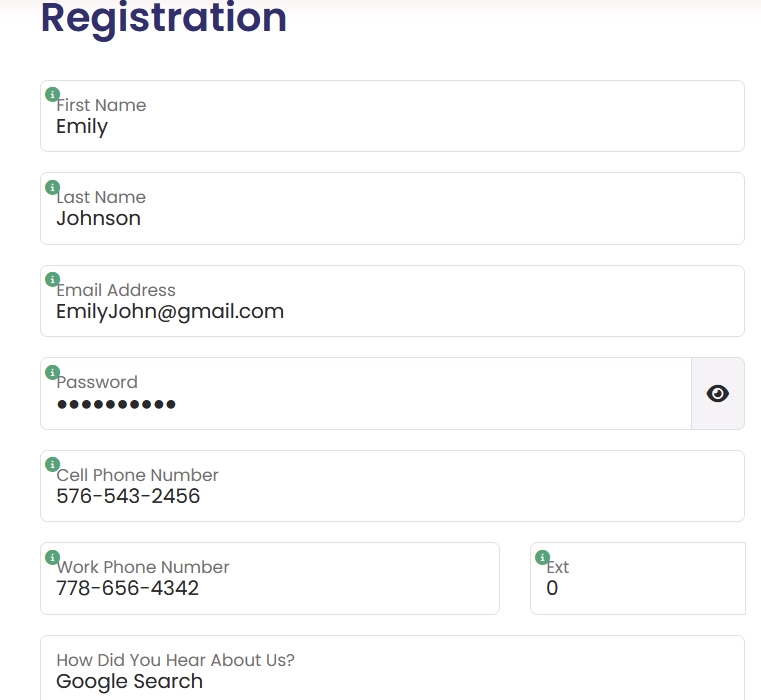
 Step 1: Registration/Login
- New Users: Click Register and enter the required information to create your profile. Once registered, simply log in using your credentials to get started.
- Existing Users: Log in to your existing profile using your registered credentials to continue.
Step 2: Add New Business (For New Users)
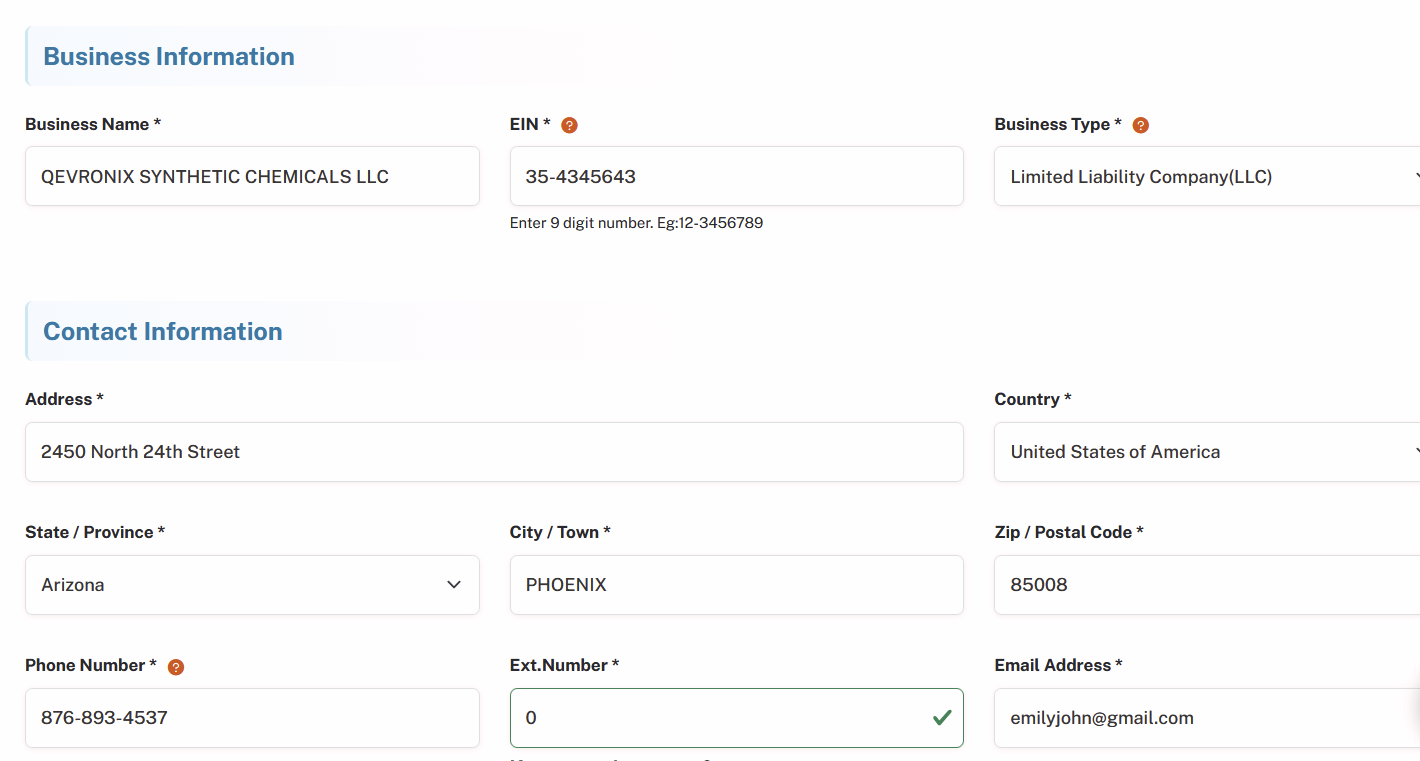
Click on Add New Business and enter your business details:
- Business Name
- Employer Identification Number (EIN)
- Business Type
- Address (with Zip Code) and Phone Number
- Signing Authority Information (Name, Title, Country, and Phone Number)
Your business information will be securely stored in our database for future filings.
- Existing Users: Select your pre-registered business from the dropdown list.
Step 3: Select Form Type
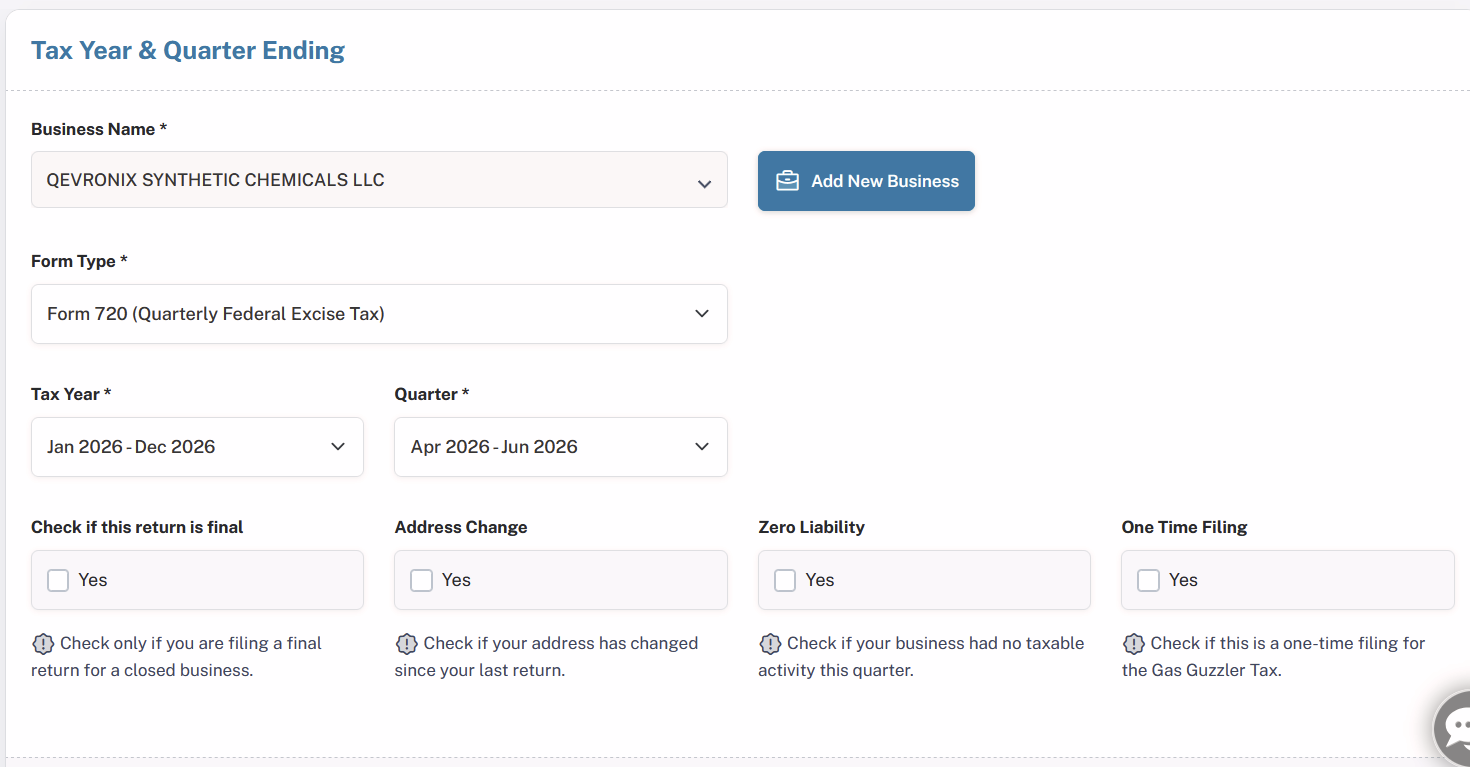
- From the dropdown menu, choose Form 720.
- Enter the Tax Year and select the correct quarter for your filing.
Step 4: Choose Filing Options
Select any applicable options, such as:
- Final Return
- Address Change
- Zero Liability
- One-Time Filing
Choose the options that best apply to your situation, and proceed to the next step.
Step 5: Select Environmental Excise Tax Category
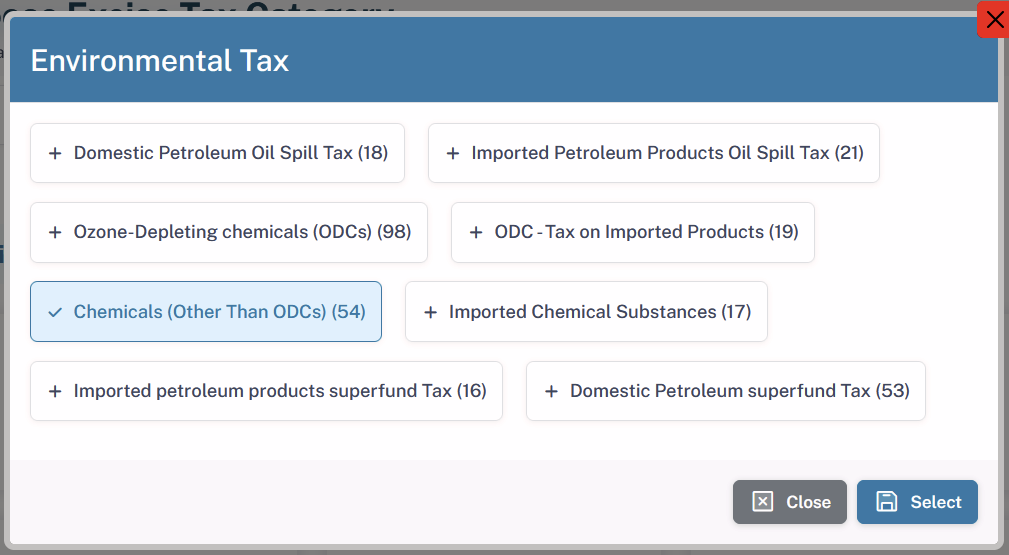
- The Environmental Tax tab lists the applicable tax categories along with their respective IRS numbers, allowing you to easily select the appropriate category for your filing.
- Example: If you are filing under Chemicals (Other than ODCs), select “Chemicals (Other than ODCs) – IRS No. 54” under the Environmental Tax tab.
Step 6: Provide Tax Details
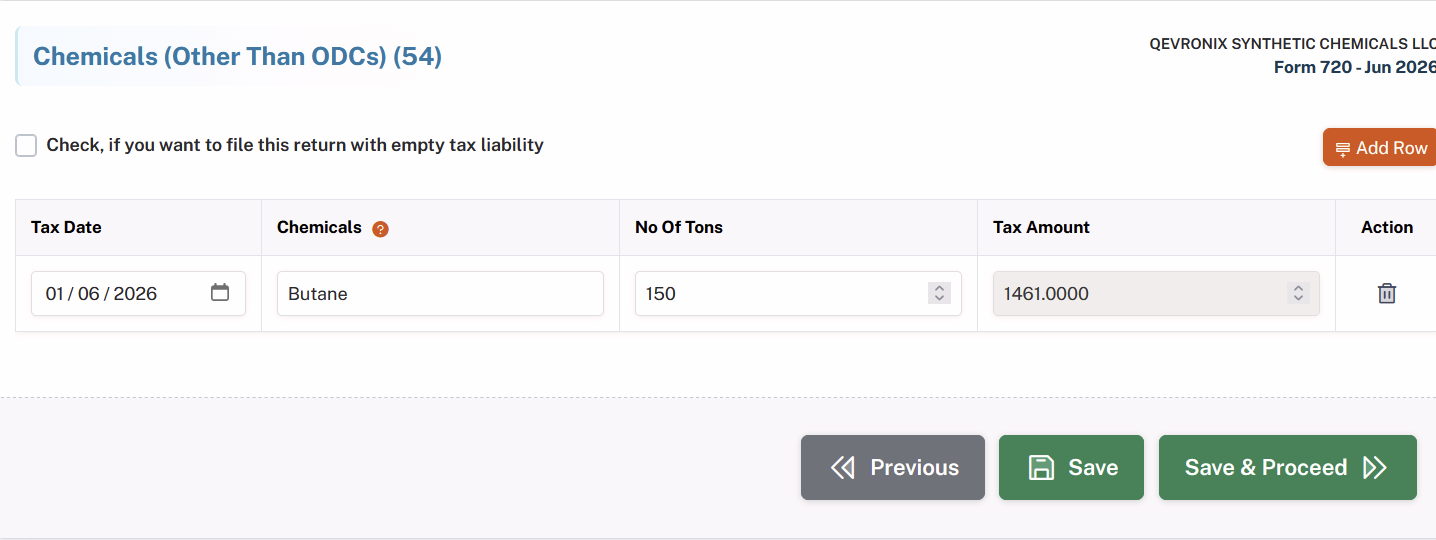
The information required will vary depending on the environmental tax category selected by the taxpayer. In this example, Chemicals (Other than ODCs) are selected. The taxpayer must provide the tax date, chemical name, and applicable quantity.
Based on the information entered, the portal will automatically calculate the applicable environmental excise tax.
Step 7: Tax Calculation
Tax Rate: 9.74 is for butane, our system will calculate the excise tax for you automatically. Please check the amount of excise tax that has been calculated.
Step 8: Claim Refunds (If Applicable)
- If you are eligible for any refunds or credits, you can claim the applicable amount at this stage.
- If no refund or credit applies to your filing, simply skip this step and proceed to the payment section.
Step 9: Calculate Deposits or Overpayments for Payment Adjustment (If Applicable)
Enter any deposits already made or applicable overpayments that can be used to adjust your current tax liability. The amount entered will be considered when calculating the remaining balance due or overpayment.
If there are no applicable deposits or overpayments, skip this step and proceed to the next section.
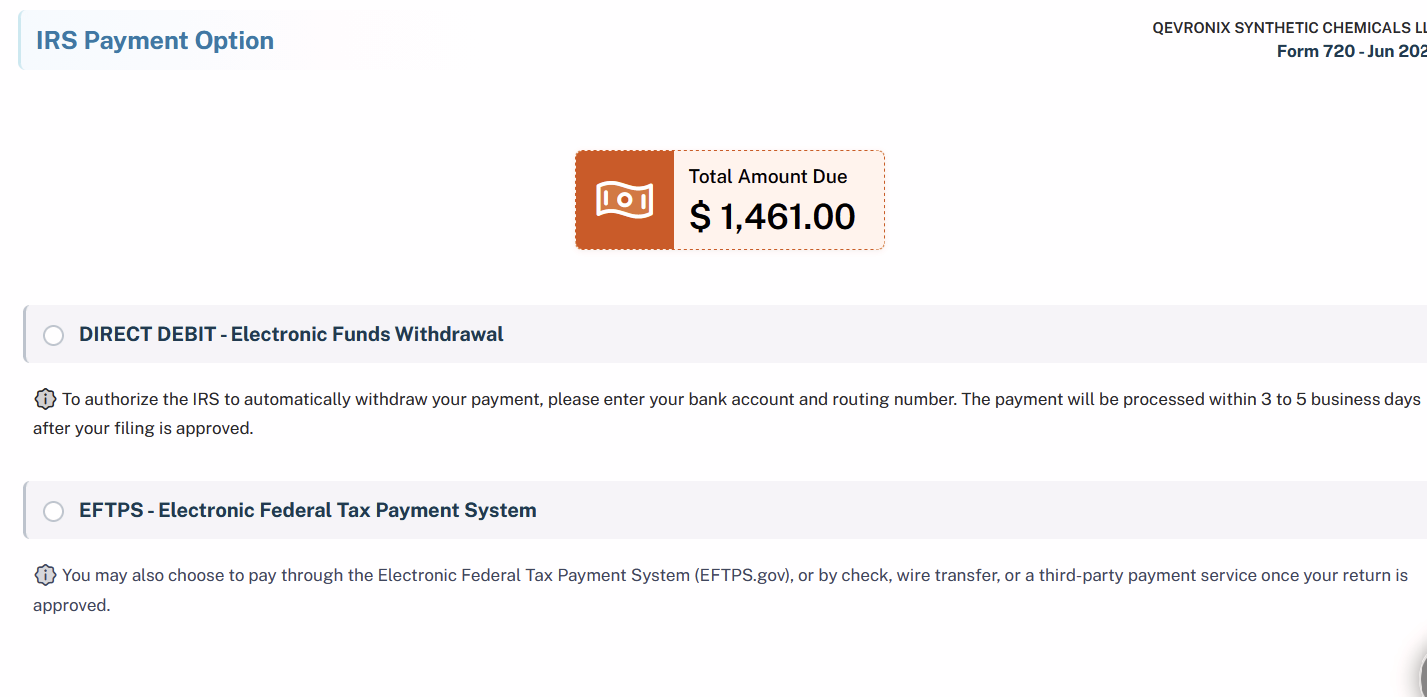
Step 10: Payment Options
Choose one of the following secure payment methods to complete your filing:
- DIRECT DEBIT (Electronic Funds Withdrawal)
- EFTPS (Electronic Federal Tax Payment System)
Step 11: Final Summary
Review the final summary of your filing, which will include:
- All options selected
- The tax amount calculated
Once you’ve verified the details, proceed to complete your payment.
Step 12: IRS Submission and Instant Acknowledgement
Once the filing fee is paid, your environmental excise tax return will be electronically submitted to the IRS. After the IRS processes the return, you will receive an acknowledgment confirming its filing status.
By following these steps, you can complete your environmental excise tax filing accurately and efficiently. If you need assistance at any stage of the filing process, our support team is always here to help.
Why Choose QuickFile720 for your Environmental Excise Tax Filing? Our Exceptional Features
1. IRS-Authorized Filing Portal - QuickFile720 is an IRS-Authorized E-Filing Portal for submitting your federal excise tax returns online. Submit your return with security and get electronic confirmation after your return has been processed by the IRS.
2. AICPA SOC 2 Certified - QuickFile720 confirms AICPA SOC 2 security standards that protect sensitive data. This will enhance security for both your business and your tax data.
3. Instant Acknowledgement - Receive an acknowledgment as soon as your return is processed and accepted by the IRS. Easily access your filing status and confirmation from your account.
4. Excellent Customer Support - Get reliable assistance from our knowledgeable support team throughout your filing process. We’re here to help resolve your filing questions quickly and efficiently.
When Is Environmental Excise Tax Due?
(Form 720 Deadlines)
According to the IRS, the environmental excise tax must be reported and paid quarterly on IRS Form 720, Quarterly Federal Excise Tax Return. along with Form 6627. The due dates will be Form 720’s due date followed,
| Quarter | Tax Period Covered | Form 720 Due Date |
|---|---|---|
| Q1 | January 1 - March 31 | April 30 |
| Q2 | April 1 - June 30 | July 31 |
| Q3 | July 1 - September 30 | October 31 |
| Q4 | October 1 - December 31 | January 31 (following year) |
Important Notes:
- If the Form 720 due date falls on a Saturday, Sunday, or legal holiday, the deadline is extended to the next business day.
- Form 720 is filed quarterly. However, you generally file for the quarter in which you have a reportable excise tax liability or filing requirement; having liability in one quarter does not by itself mean you must file all four quarters.
- Environmental excise tax categories can sometimes be confusing, especially when identifying the correct category and corresponding IRS number. Carefully review all applicable categories before filing.
- Do not overlook Part II of Form 720. The ODC Floor Stocks Tax (IRS No. 20) is an environmental tax category reported under Part II, while the other major environmental taxes are reported under Part I.
What are the Environmental Excise Tax Penalties
(IRS Rules)
The penalties levied against the environmental excise tax are similar to the penalty levied against form 720 because it is filed through Form 720.
Below are the common penalties applicable to Form 720 filings.
| Penalty Type | Description | Penalty Amount |
|---|---|---|
| Late Filing Penalty | If Form 720 is filed after the due date and there is unpaid tax. | 5% of the unpaid tax per month (or part of a month), up to 25% of the total unpaid tax. |
| Late Payment Penalty | If the excise tax due is not paid by the filing deadline. | 0.5% of the unpaid tax per month, up to 25% of the unpaid tax. |
| Interest on Unpaid Taxes | Interest is charged on unpaid taxes and penalties until the balance is fully paid. | Interest accrues from the due date of the return until payment is made. |
| Failure to Deposit Penalty | If required excise tax deposits (such as semimonthly deposits) are not made correctly. | The penalty amount varies depending on how late the deposit is made. |
Important Notes
- Late filing and late payment penalties may be charged concurrently; however, in the case where both penalties are charged for the same month, the late filing penalty is reduced.
- The interest charges will continue to accrue until the total tax with penalties is paid.
- Large tax payers who pay excise taxes need to pay regularly or else incur penalties.
How to Avoid Environmental Excise Tax – Form 720 Penalties
To prevent penalties and additional charges for the Environmental Excise Tax, follow these essential steps:
- File Within the Deadline - File Form 720 by the applicable due date to avoid potential late-filing penalties.
- Pay the tax in full - Pay the full tax amount by the applicable payment deadline to avoid potential penalties and interest on unpaid taxes.
Key Points to Remember for Environmental Excise Tax:
1. Refer to Form 6627 for Environmental Tax Rates
The applicable tax rates for environmental tax categories are not directly listed on Form 720. Always refer to the latest Form 6627, Environmental Taxes, and its related IRS instructions to determine the correct applicable tax rate.
2. Form 720 and Form 6627 in One Interface
QuickFile720 provides a single filing interface that incorporates both Form 720 and Form 6627 requirements, helping you enter environmental tax information and complete the filing without navigating between separate forms.
3. Report All Applicable Chemical Tax Liabilities
If your business deals with multiple taxable chemicals, make sure to report each chemical for which you have an excise tax liability. Provide the required details for every applicable chemical to ensure the total environmental excise tax is calculated and reported correctly.