Truck Excise Tax Online Filing Guide
What is Truck Retail Excise Tax?
Truck Excise Tax(Retail) is an excise tax at 12% charged by the federal government for the initial retail sale of specified heavy trucks, trailers, semi-trailer chassis and bodies, and highway tractors. This tax is payable by the person who makes the first retail sale, and this includes the manufacturer, producer or importer of such products. It is filed quarterly on IRS Form 720, Quarterly Federal Excise Tax Return (IRS No. 33 – Truck, Trailer, and Semi-Trailer Chassis and Bodies, and Tractors) under Retail Tax category.
This tax applies whenever there is a sale of taxable vehicles for use on public highways, and some of these taxable vehicles include truck chassis and body, trailer chassis and body, and tractors designed for use on public highways.
The retail excise tax applies under Internal Revenue Code Section 4051, whereby there is federal excise tax on the first retail sale of heavy trucks, trailers, and tractors.
Truck Excise Tax - Step-by-Step Online Filing Guide(with QuickFile720)
 Step 1: Registration/Login
- New Users: Just click on Register to fill out your basic information and register for an account. After registration, just login to your account using your login credentials.
- Existing Users: Login to your existing account using your login credentials.
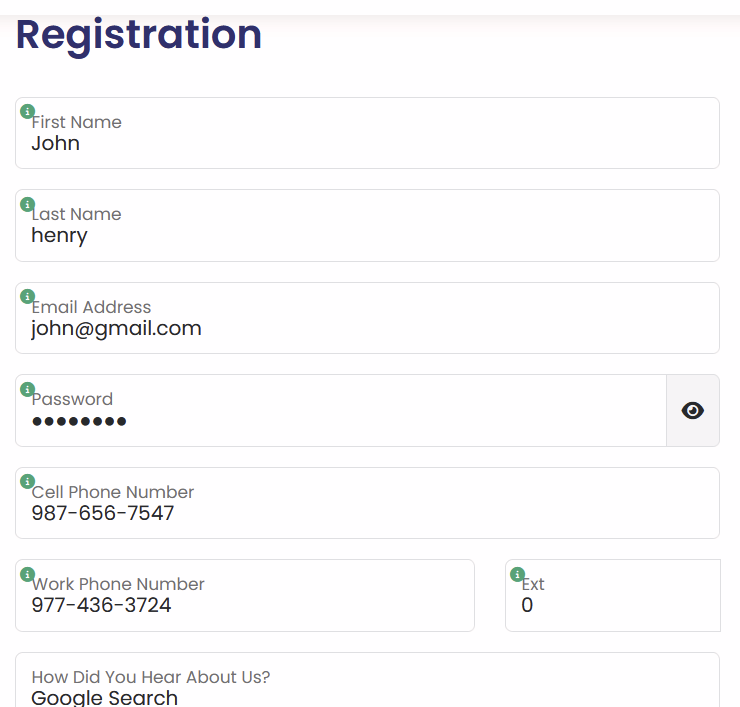 class="img-fluid m-4 border rounded" alt="Form720-Online-Filing-Guide-Step1"/>
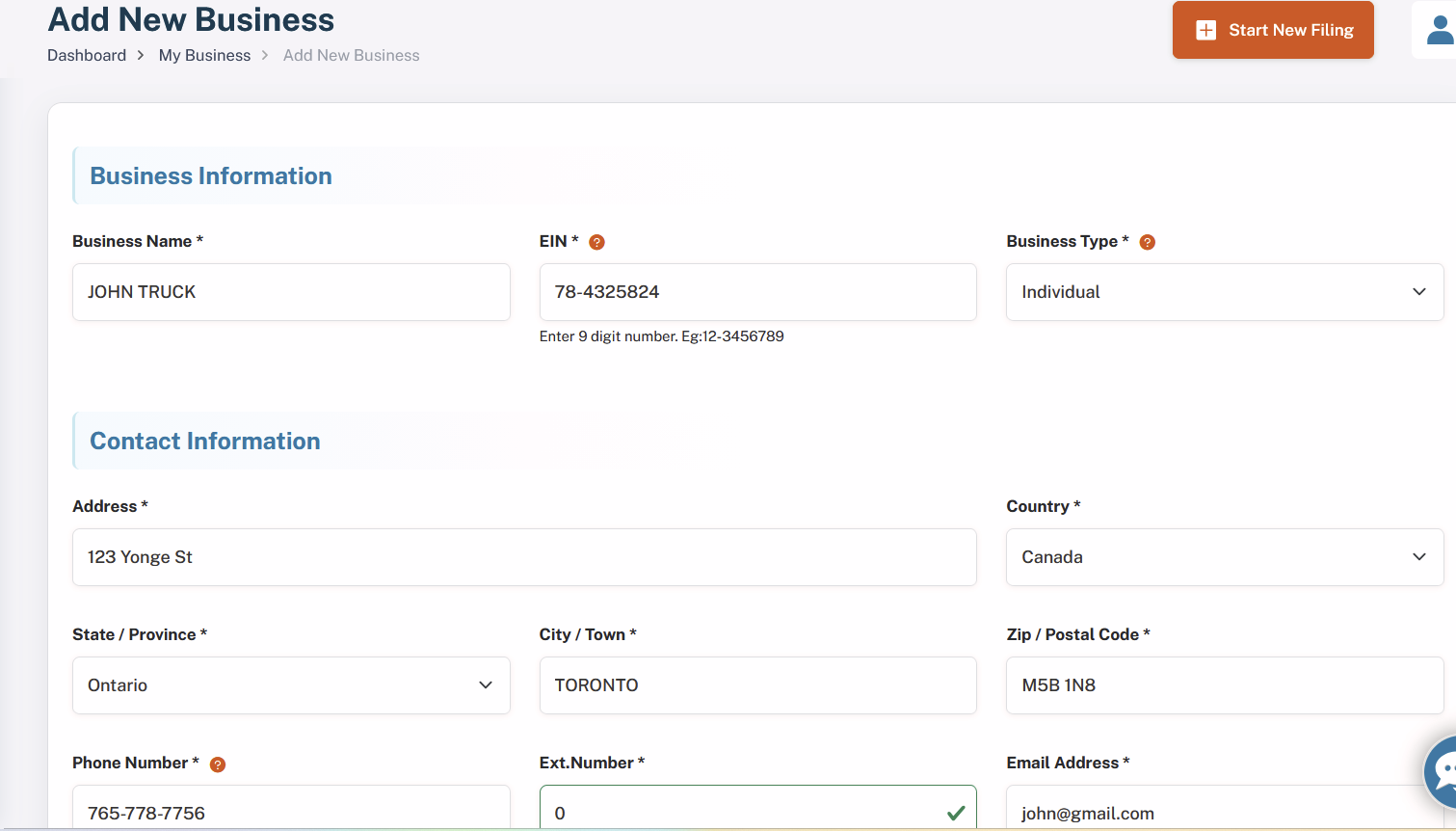
Step 2: Add New Business (For New Users)
Click on Add New Businessand enter your business details:
- Business Name
- Employer Identification Number (EIN)
- Business Type
- Address (with Zip Code) and Phone Number
- Signing Authority Information (Name, Title, Country, and Phone Number)
Your business information will be securely stored in our database for future filings.
- Existing Users: Select your pre-registered business from the dropdown list.
Step 3: Select Form Type
- From the dropdown menu, choose Form 720.
- Enter the Tax Year and select the correct quarterfor your filing.
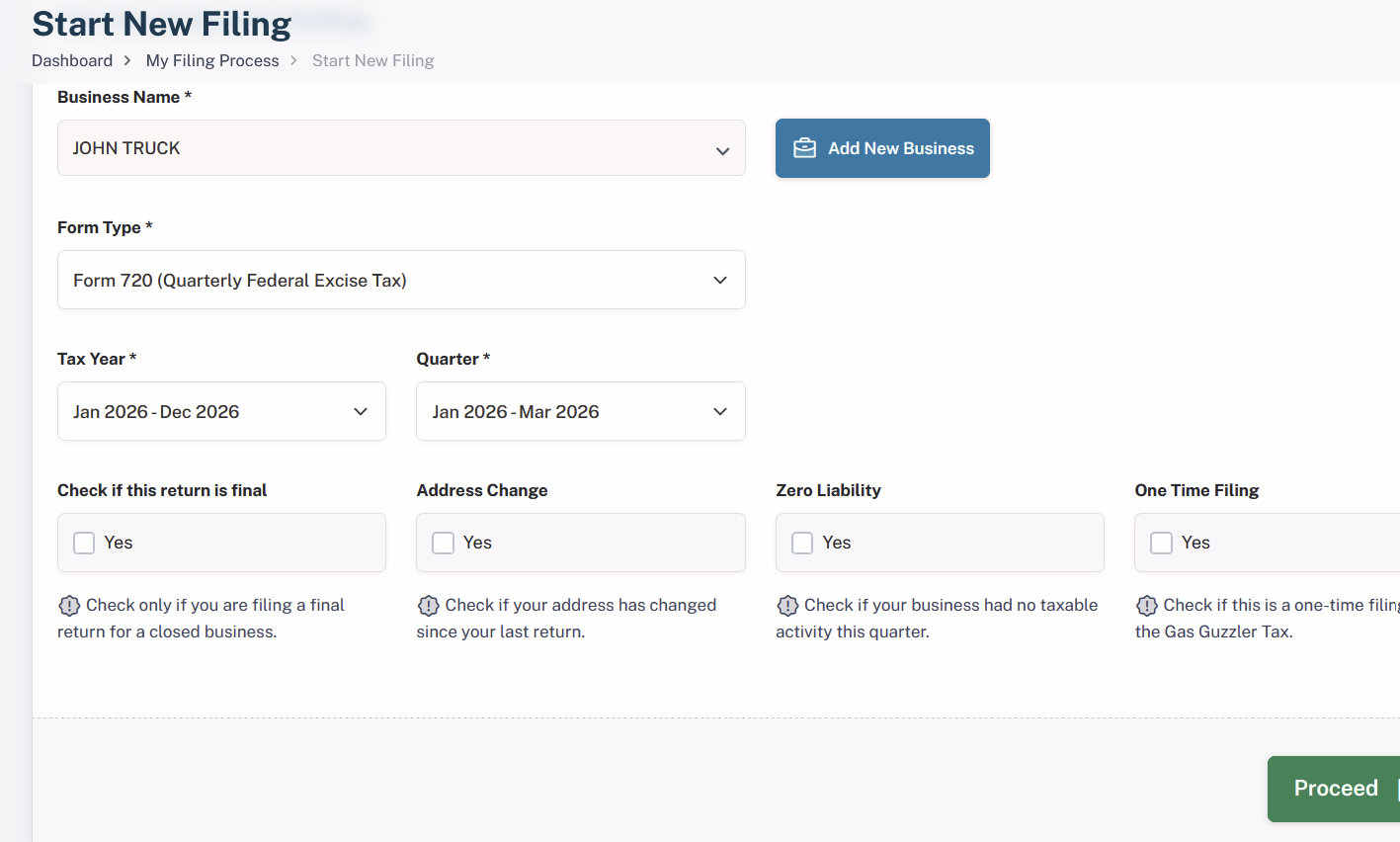
Step 4: Choose Filing Options
Select any applicable options, such as:
- Final Return
- Address Change
- Zero Liability
- One-Time Filing
Choose the options that best apply to your situation, and proceed to the next step.
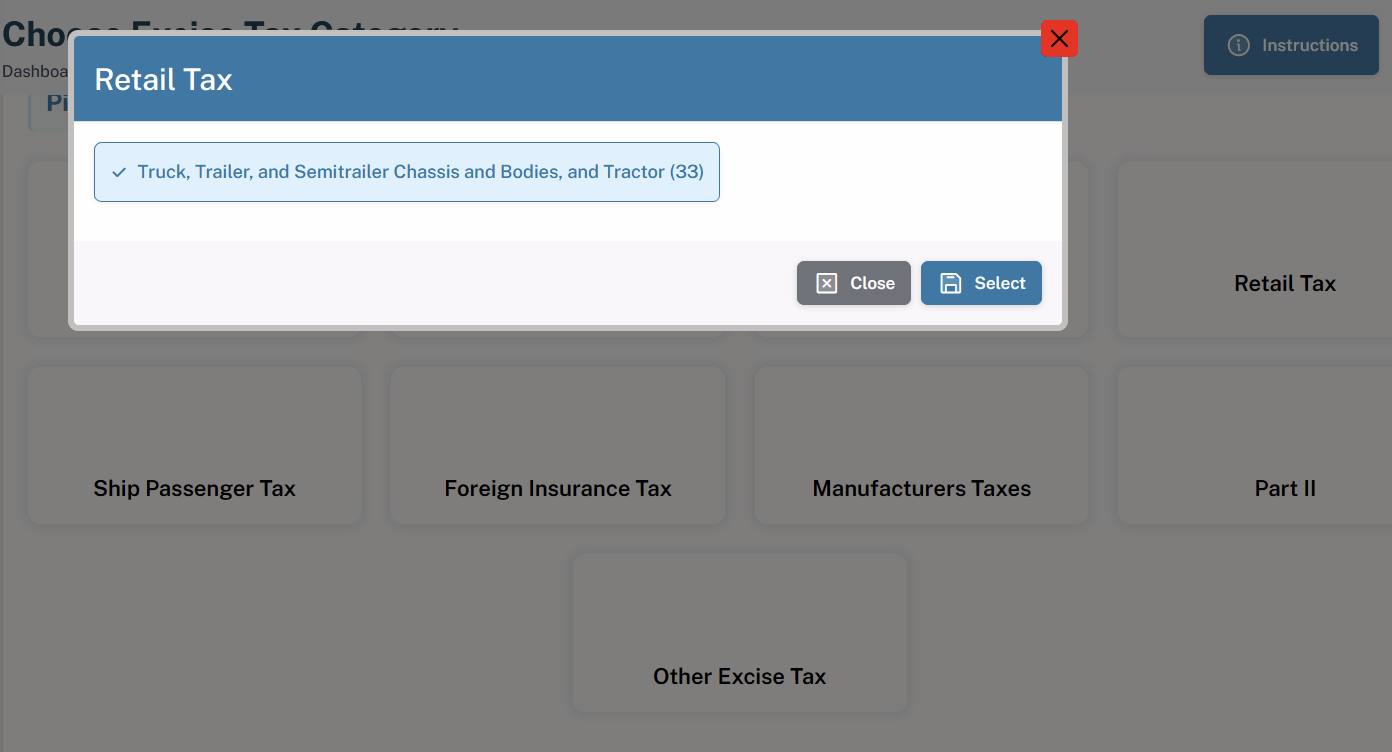
Step 5: Select Truck Excise Tax Category
- We’ve provided well-organized categories with corresponding IRS numbers for easy selection.
- Choose “Truck, Trailer, and Semitrailer Chassis and Bodies, and Tractor (33)”under Retail Excise Tax category to file your truck excise tax.
Step 6: Provide Tax Details
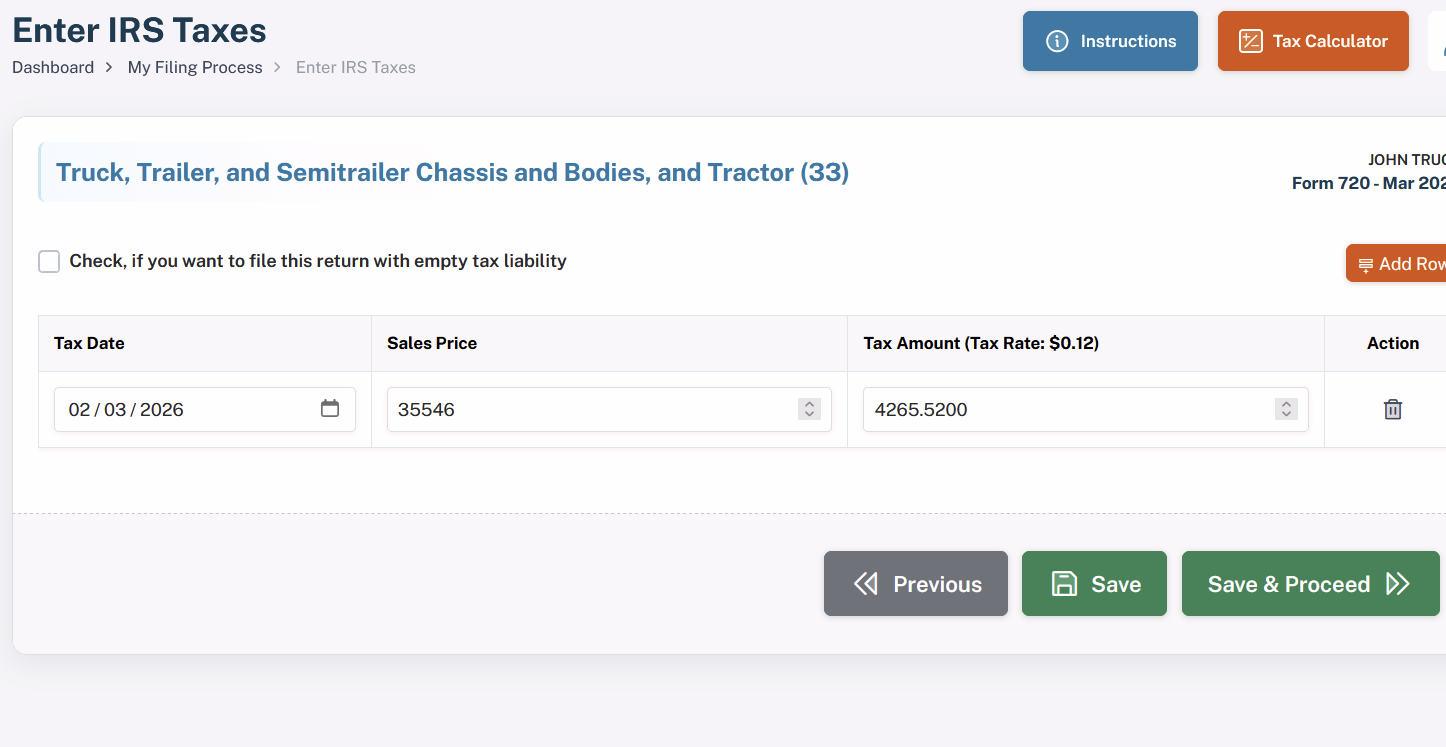
Depending on your chosen category for tax, there will be details that have to be provided by you to determine the total tax amount. In the case of truck excise tax, the tax date and sales price should be provided.
Kindly check the details as the tax amount will be determined based on the provided information.
Step 7: Tax Calculation
Based on the Tax Rate of $0.12 per sales price entered, our portal will automatically determine your truck excise tax. Please examine the determined tax amount shown on screen.
Step 8: Claim Refunds (If Applicable)
- If you're eligible for any refunds, you will have the option to claim your refund at this stage.
- If you are not eligible for a refund, simply skip this step and proceed to payment.
Step 9: Calculate Deposits or Overpayments for Payment Adjustment (If Applicable)
In this step, you can choose to calculate any deposits or over payments which you might have made. If this is the case, you can then utilize these numbers in making your payment calculations. If there are no adjustments for you to make in your filing, simply go ahead to the next step.
Step 10: Payment Options
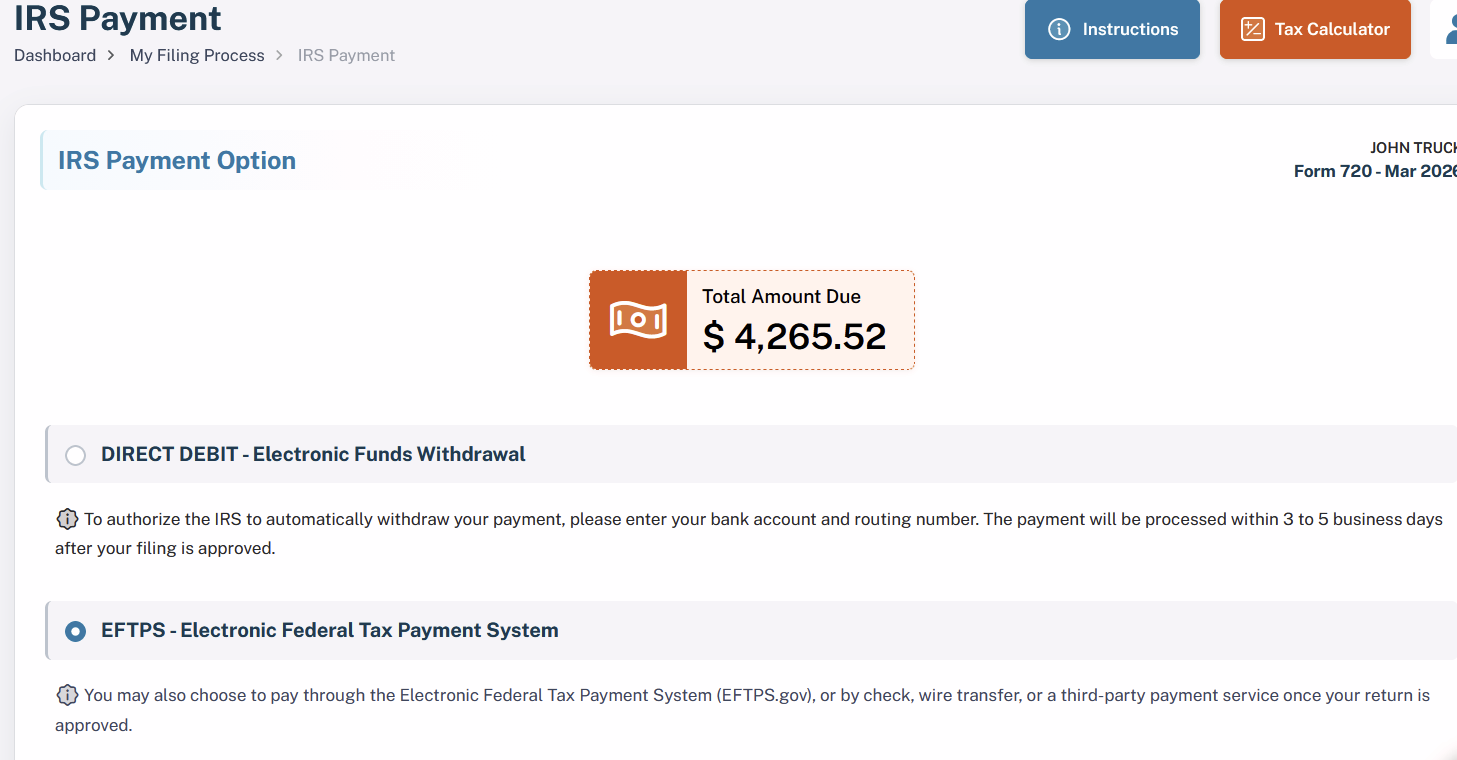
Choose one of the following secure payment methods to complete your filing:
- DIRECT DEBIT (Electronic Funds Withdrawal)
- EFTPS (Electronic Federal Tax Payment System)
Step 11: Final Summary
Review the final summary of your filing, which will include:
- All options selected
- The tax amount calculated
Once you’ve verified the details, proceed to complete your payment.
Step 12: IRS Submission and Instant Acknowledgement
After the completion of your payment process, your truck excise tax return form will be successfully submitted to the IRS. Once it gets approved, you will immediately get an acknowledgment from us. Most likely, the IRS will approve your return form within a couple of hours.
This entire process guarantees a proper submission of your truck excise tax return form. Any kind of help required from our side can be availed at any time.
Why Choose QuickFile720 for your Truck Excise Tax Filing? Our Exceptional Features
IRS-Authorized Portal – Feel confident in our services as we are an official IRS authorized 720 online filing system that follows all the rules laid down by the IRS.
AICPA SOC Certified Portal – Be assured that we meet all the necessary industry standards, having an AICPA SOC 2 certificate and hence providing the best security, privacy and integrity.
Most Affordable Portal – Get high quality online filing services from us at only $35.95 per filing.
Instant IRS Acknowledgement - QuickFile720 gives immediate acknowledgment from the IRS on the filing of the return successfully, and you can be assured right away that your truck excise tax return has been filed successfully at the IRS.
When Is Truck Excise Tax Due? (Form 720 Deadlines)
According to the IRS, the truck tax must be reported and paid quarterly on IRS Form 720, Quarterly Federal Excise Tax Return.
| Quarter | Tax Period Covered | Form 720 Due Date |
|---|---|---|
| Q1 | January 1 – March 31 | April 30 |
| Q2 | April 1 – June 30 | July 31 |
| Q3 | July 1 – September 30 | October 31 |
| Q4 | October 1 – December 31 | January 31 (following year) |
Important Notes:
- If a due date falls on a weekend or federal holiday, the deadline is automatically moved to the next business day.
- Form 720 must be submitted on a quarterly basis, regardless of whether you have liability in just one quarter within the year.
- The Truck Retail Excise Tax is different from the Heavy Highway Vehicle Use Tax (HVUT) reported on Form 2290, which applies to owners/operators of taxable highway motor vehicles weighing 55,000 pounds or more that are used on public highways.
This schedule will enable firms to comply with IRS quarterly tax filing and payment rules on the truck excise tax.
What are the Truck Excise Tax Penalties (IRS Rules)
Penalties imposed on the truck tax are the same as that imposed on Form 720 because the transfer of remittance excise tax is calculated using IRS Form 720.
Below are the common penalties applicable to Form 720 filings.
| Penalty Type | Description | Penalty Amount |
|---|---|---|
| Late Filing Penalty | If Form 720 is filed after the due date and there is unpaid tax. | 5% of the unpaid tax per month (or part of a month), up to 25% of the total unpaid tax. |
| Late Payment Penalty | If the excise tax due is not paid by the filing deadline. | 0.5% of the unpaid tax per month, up to 25% of the unpaid tax. |
| Interest on Unpaid Taxes | Interest is charged on unpaid taxes and penalties until the balance is fully paid. | Interest accrues from the due date of the return until payment is made. |
| Failure to Deposit Penalty | If required excise tax deposits (such as semimonthly deposits) are not made correctly. | The penalty amount varies depending on how late the deposit is made. |
Important Notes
- The late filing penalty and late payment penalty can both be applicable at the same time, although the late filing penalty will be reduced if both are applicable in the same month.
- The interest will continue to accumulate until the complete tax and penalties have been paid.
- Larger taxpayers of excise tax will also have to deposit their taxes regularly, and failure to do so will result in further penalties.
How to Avoid Truck Excise Tax – Form 720 Penalties
To prevent penalties and additional charges for the Truck Excise Tax, follow these essential steps:
1. File on Time Submit your Form 720 for Truck Excise Tax by the quarterly due date to avoid late filing penalties.
2. Pay the Full Tax Amount - Make sure that you pay the full amount owed by way of taxes. Not doing so will bring about penalties.
Key Points to Remember for Truck Tax:
- Tax Rate: 12% of the sales price of the taxable vehicle
- Reported On: Form 720, Quarterly Federal Excise Tax Return.
- IRS Number: 33 - Truck, Trailer, and Semitrailer Chassis and Bodies, and Tractors.
- Responsible Party: Generally, the manufacturer, producer, or importer making the first retail sale
- Tax Code: The tax is imposed under Internal Revenue Code Section 4051.